品牌高端网站制作公司网站浏览器
kubernetes基于helm部署gitlab-operator
这篇博文介绍如何在 Kubernetes 中使用helm部署 GitLab-operator。
先决条件
- 已运行的 Kubernetes 集群
- 负载均衡器,为ingress-nginx控制器提供EXTERNAL-IP,本示例使用metallb
- 默认存储类,为gitlab pods提供持久化存储,本示例使用openebs
- cert-manager,为gitlab提供自签名证书
root@ubuntu:~# kubectl -n metallb-system get pods
NAME                                  READY   STATUS    RESTARTS   AGE
metallb-controller-7d644d8b89-8748v   1/1     Running   0          10d
metallb-speaker-mbjfb                 1/1     Running   0          10droot@ubuntu:~# kubectl get sc
NAME                         PROVISIONER        RECLAIMPOLICY   VOLUMEBINDINGMODE      ALLOWVOLUMEEXPANSION   AGE
openebs-hostpath (default)   openebs.io/local   Delete          WaitForFirstConsumer   false                  10droot@ubuntu:~# kubectl -n cert-manager get pods
NAME                                       READY   STATUS    RESTARTS   AGE
cert-manager-7bd4d4cdff-8fbtb              1/1     Running   0          10d
cert-manager-cainjector-5cdc7f9c66-k494w   1/1     Running   0          10d
cert-manager-webhook-77c8d4fd8d-lwxxt      1/1     Running   0          10d
项目地址:https://gitlab.com/gitlab-org/cloud-native/gitlab-operator
官方文档:https://docs.gitlab.com/operator/installation.html
部署gitlab-operator
添加gitlab-operator helm 仓库
helm repo add gitlab-operator https://gitlab.com/api/v4/projects/18899486/packages/helm/stable
使用helm部署gitlab-operator
helm upgrade --install gitlab-operator gitlab-operator/gitlab-operator \--namespace gitlab-system \--create-namespace
查看运行的gitlab-operator pods
root@ubuntu:~# kubectl -n gitlab-system get pods
NAME                                        READY   STATUS    RESTARTS   AGE
gitlab-controller-manager-8f9956d6f-78h26   2/2     Running   0          22s
创建 GitLab 自定义资源 (CR)
$ cat mygitlab.yaml
apiVersion: apps.gitlab.com/v1beta1
kind: GitLab
metadata:name: gitlabnamespace: gitlab-system
spec:chart:version: "7.1.2" # https://gitlab.com/gitlab-org/cloud-native/gitlab-operator/-/blob/master/CHART_VERSIONSvalues:global:edition: cehosts:domain: example.comingress:configureCertmanager: truecertmanager-issuer:email: youremail@example.com
部署gitlab实例
kubectl apply -f mygitlab.yaml
查看运行的pods
root@ubuntu:~# kubectl -n gitlab-system get pods
NAME                                              READY   STATUS      RESTARTS   AGE
gitlab-controller-manager-8f9956d6f-78h26         2/2     Running     0          6m20s
gitlab-gitaly-0                                   1/1     Running     0          4m2s
gitlab-gitlab-exporter-5995f6684b-fjpjz           1/1     Running     0          3m20s
gitlab-gitlab-shell-7994f99cb6-r2s8n              1/1     Running     0          3m21s
gitlab-kas-766596f95c-4ljtx                       1/1     Running     0          3m20s
gitlab-migrations-1-f92-1-4rhpc                   0/1     Completed   0          3m20s
gitlab-minio-597fdc58cd-74k6r                     1/1     Running     0          4m2s
gitlab-minio-create-buckets-1-wghhz               0/1     Completed   0          4m2s
gitlab-nginx-ingress-controller-cdb4f99d6-l9tqm   1/1     Running     0          4m22s
gitlab-nginx-ingress-controller-cdb4f99d6-pmf9p   1/1     Running     0          4m22s
gitlab-postgresql-0                               2/2     Running     0          4m2s
gitlab-redis-master-0                             2/2     Running     0          4m2s
gitlab-registry-ddb69f4c9-cqrrq                   1/1     Running     0          3m21s
gitlab-shared-secrets-1-z8p-ntk7g                 0/1     Completed   0          4m22s
gitlab-sidekiq-all-in-1-v2-74489fc8b9-b7s2z       1/1     Running     0          87s
gitlab-toolbox-668cb9bdc7-nhx89                   1/1     Running     0          3m20s
gitlab-webservice-default-558795cff7-zvwsq        2/2     Running     0          87s
查看service,确认gitlab-nginx-ingress-controller service是否分配EXTERNAL-IP
root@ubuntu:~# kubectl -n gitlab-system get svc
NAME                                        TYPE           CLUSTER-IP    EXTERNAL-IP      PORT(S)                                   AGE
gitlab-controller-manager-metrics-service   ClusterIP      10.96.0.121   <none>           8443/TCP                                  6m48s
gitlab-gitaly                               ClusterIP      None          <none>           8075/TCP,9236/TCP                         4m30s
gitlab-gitlab-exporter                      ClusterIP      10.96.0.110   <none>           9168/TCP                                  3m48s
gitlab-gitlab-shell                         ClusterIP      10.96.3.153   <none>           22/TCP                                    3m49s
gitlab-kas                                  ClusterIP      10.96.3.81    <none>           8150/TCP,8153/TCP,8154/TCP,8151/TCP       3m48s
gitlab-minio-svc                            ClusterIP      10.96.0.154   <none>           9000/TCP                                  4m30s
gitlab-nginx-ingress-controller             LoadBalancer   10.96.3.92    192.168.72.200   80:31118/TCP,443:30763/TCP,22:32004/TCP   4m50s
gitlab-nginx-ingress-controller-metrics     ClusterIP      10.96.2.133   <none>           10254/TCP                                 4m50s
gitlab-postgresql                           ClusterIP      10.96.2.120   <none>           5432/TCP                                  4m30s
gitlab-postgresql-hl                        ClusterIP      None          <none>           5432/TCP                                  4m30s
gitlab-postgresql-metrics                   ClusterIP      10.96.0.76    <none>           9187/TCP                                  4m30s
gitlab-redis-headless                       ClusterIP      None          <none>           6379/TCP                                  4m30s
gitlab-redis-master                         ClusterIP      10.96.3.221   <none>           6379/TCP                                  4m30s
gitlab-redis-metrics                        ClusterIP      10.96.0.82    <none>           9121/TCP                                  4m30s
gitlab-registry                             ClusterIP      10.96.1.1     <none>           5000/TCP                                  3m49s
gitlab-webhook-service                      ClusterIP      10.96.2.47    <none>           443/TCP                                   6m48s
gitlab-webservice-default                   ClusterIP      10.96.2.13    <none>           8080/TCP,8181/TCP,8083/TCP                3m48s
查看ingress
root@ubuntu:~# kubectl -n gitlab-system get ingress
NAME                        CLASS          HOSTS                  ADDRESS          PORTS     AGE
gitlab-kas                  gitlab-nginx   kas.cloudce.com        192.168.72.201   80, 443   4m17s
gitlab-minio                gitlab-nginx   minio.cloudce.com      192.168.72.201   80, 443   4m59s
gitlab-registry             gitlab-nginx   registry.cloudce.com   192.168.72.201   80, 443   4m18s
gitlab-webservice-default   gitlab-nginx   gitlab.cloudce.com     192.168.72.201   80, 443   4m17s
查看pv卷
root@ubuntu:~# kubectl -n gitlab-system get pv
NAME                                       CAPACITY   ACCESS MODES   RECLAIM POLICY   STATUS   CLAIM                                                    STORAGECLASS       REASON   AGE
pvc-0465c308-b141-409a-b6bc-24045c2ec944   8Gi        RWO            Delete           Bound    gitlab-system/data-gitlab-postgresql-0                   openebs-hostpath            5m33s
pvc-49fae8fb-ce89-4001-888d-03aa39bd2143   8Gi        RWO            Delete           Bound    gitlab-system/redis-data-gitlab-redis-master-0           openebs-hostpath            5m32s
pvc-7a77d996-1115-4a1c-9bb0-d3fe91441482   50Gi       RWO            Delete           Bound    gitlab-system/repo-data-gitlab-gitaly-0                  openebs-hostpath            5m34s
pvc-ea6981f6-742b-40c8-be1e-ad7cea21845c   10Gi       RWO            Delete           Bound    gitlab-system/gitlab-minio                               openebs-hostpath            5m32s
访问gitlab
获取gitlab UI root用户的登陆密码
root@ubuntu:~# kubectl -n gitlab-system get secret gitlab-gitlab-initial-root-password -ojsonpath='{.data.password}' | base64 --decode ; echo
bvTyB0UUwXA3VhVywKOIzdD29KVJV64LB2Td0pyzAJUYe8pcTTOFSYla1SVpXeIx
获取gitlab UI 登陆的URL地址,如果设置 global.hosts.domain=example.com,那么访问地址为
https://gitlab.example.com
配置本地域名解析,其中192.168.72.200为上文gitlab-nginx-ingress-controller service的EXTERNAL-IP
gitlab.example.com 192.168.72.200
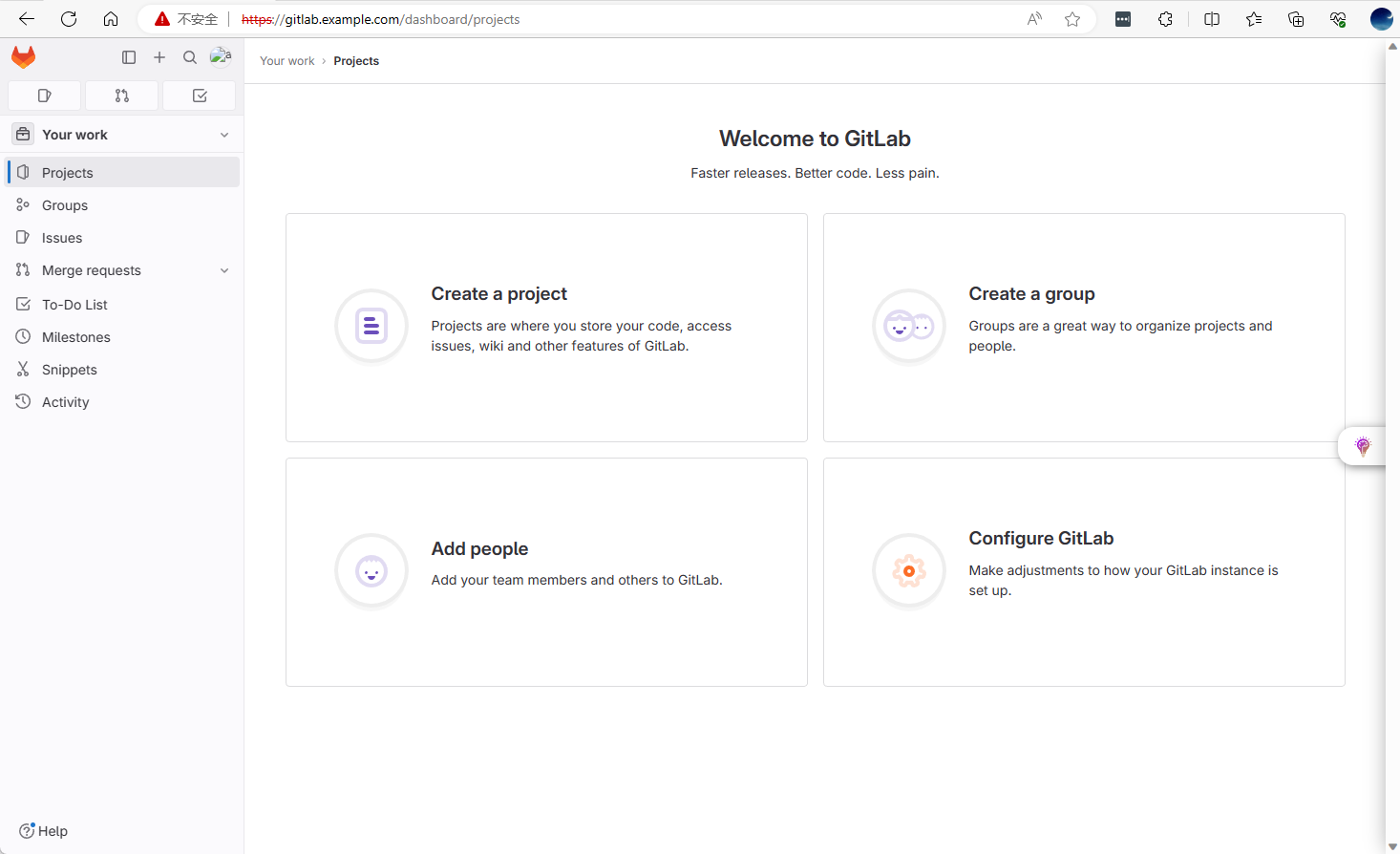
登录gitlab后界面如下: