1、拖拽插件安装
npm i -S vuedraggable
// vuedraggable依赖Sortable.js,我们可以直接引入Sortable使用Sortable的特性。
// vuedraggable是Sortable的一种加强,实现组件化的思想,可以结合Vue,使用起来更方便。
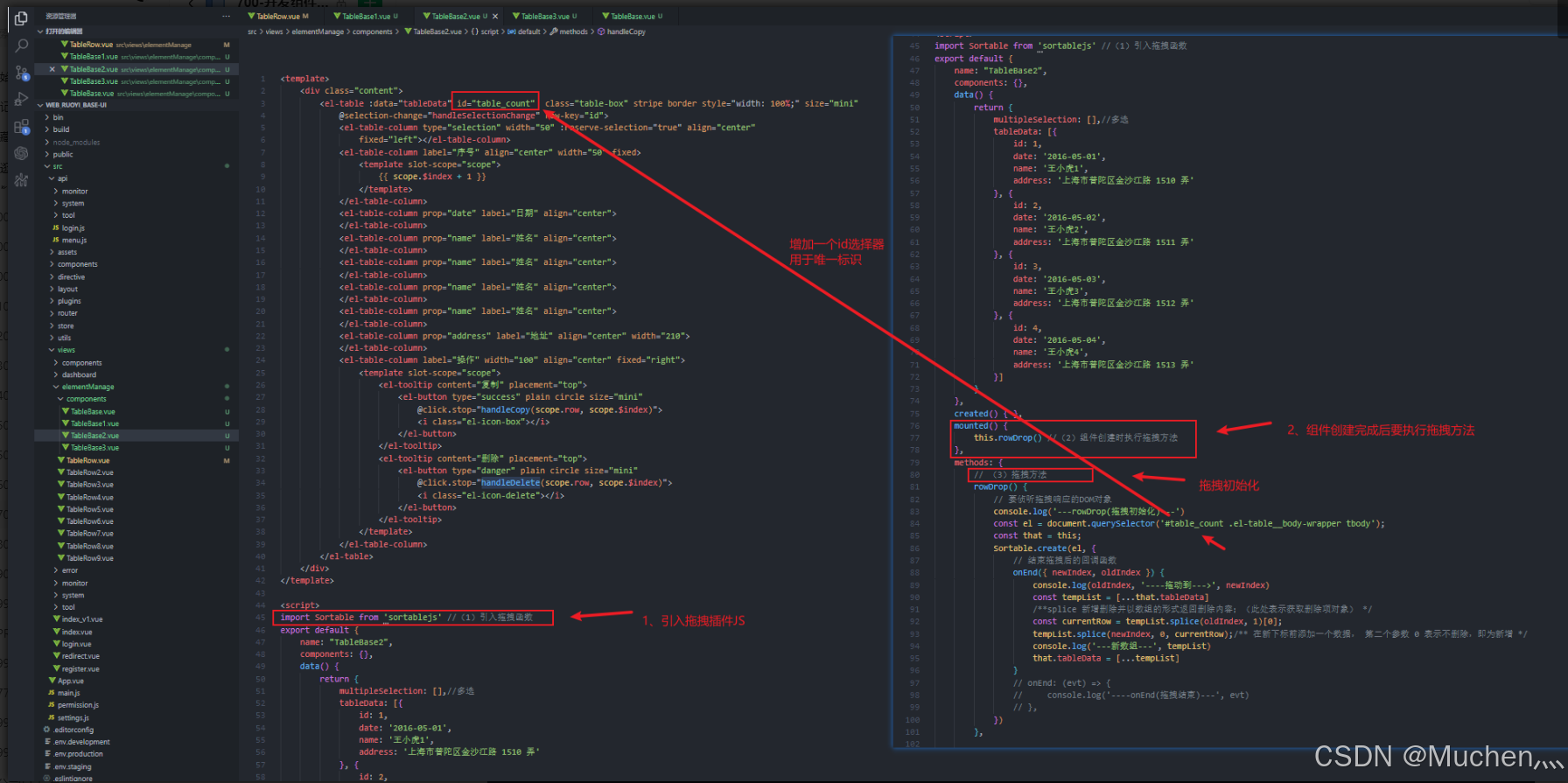
2、引入拖拽函数
import Sortable from 'sortablejs' //(1)引入拖拽函数mounted() {this.rowDrop() //(2)组件创建时执行拖拽方法},// (3)拖拽方法rowDrop() {// 要侦听拖拽响应的DOM对象console.log('---rowDrop(拖拽初始化)---')const el = document.querySelector('#table_count2 .el-table__body-wrapper tbody');const that = this;new Sortable(el, {animation: 150,handle: '.handle_drop', //class类名执行事件ghostClass: 'blue-background-class',// 结束拖拽后的回调函数onEnd({ newIndex, oldIndex }) {console.log(oldIndex, '----拖动到--->', newIndex)const tempList = [...that.tableData]/**splice 新增删除并以数组的形式返回删除内容;(此处表示获取删除项对象) */const currentRow = tempList.splice(oldIndex, 1)[0];tempList.splice(newIndex, 0, currentRow);/** 在新下标前添加一个数据, 第二个参数 0 表示不删除,即为新增 */console.log('---新数组---', tempList)that.tableData = [...tempList]}// onEnd: (evt) => {// console.log('----onEnd(拖拽结束)---', evt)// },});},
3、el-table指定点拖拽(完整代码)

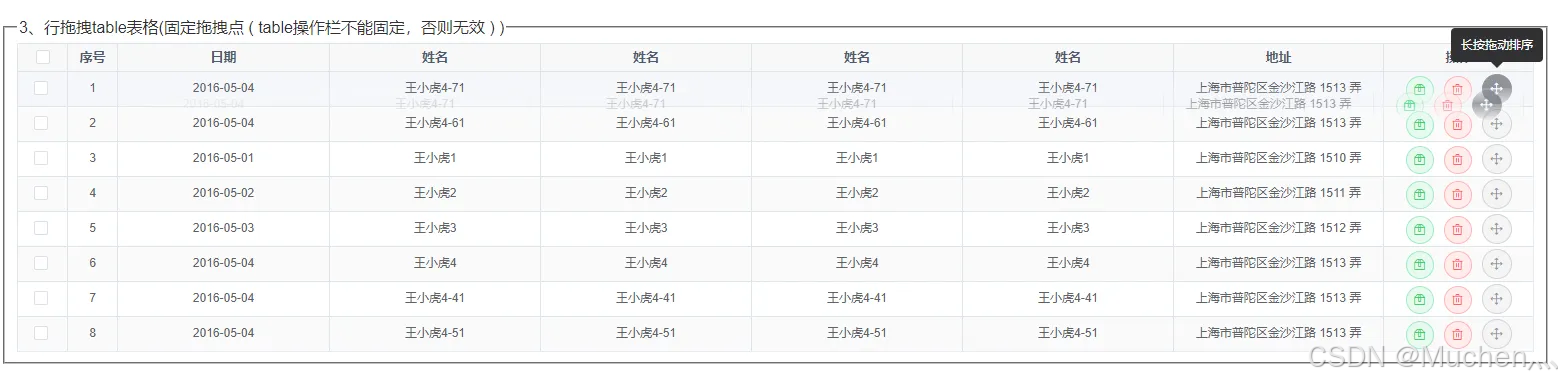
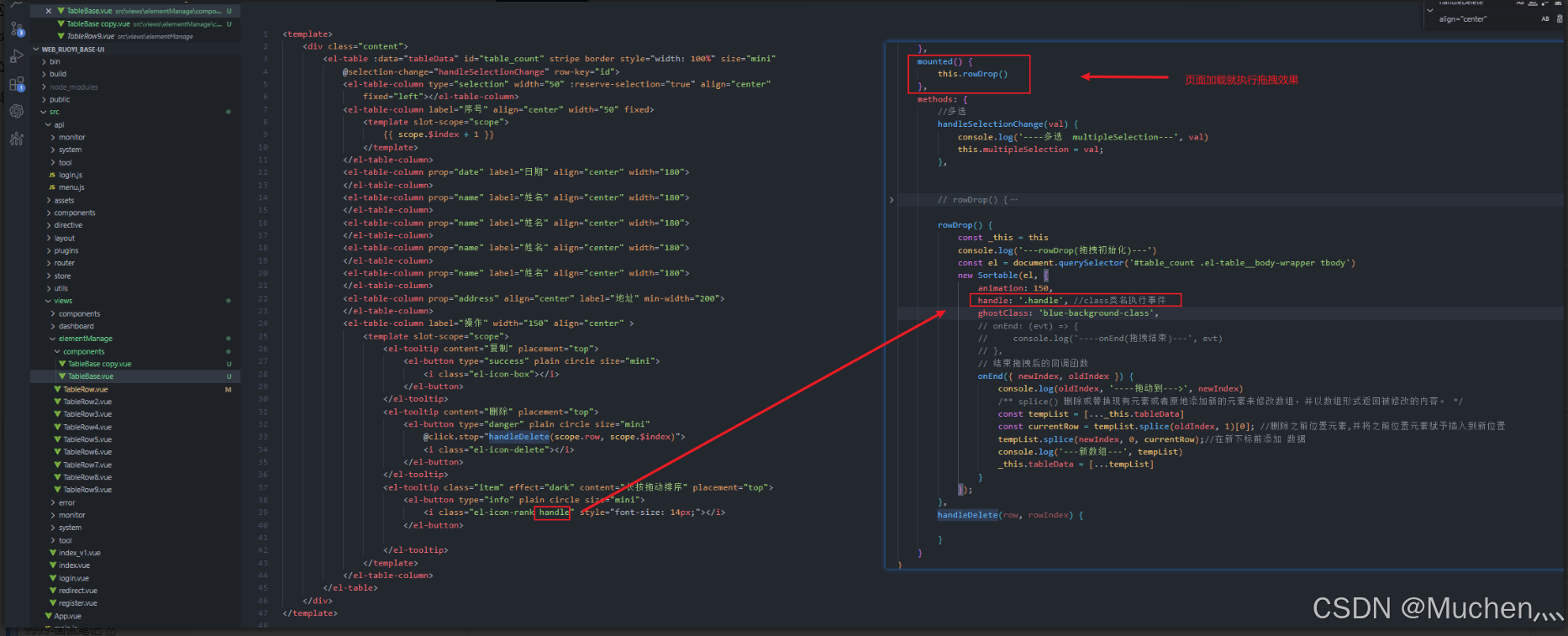
<template><div class="content"><el-table :data="tableData" id="table_count2" class="table-box" stripe border style="width: 100%;" size="mini"@selection-change="handleSelectionChange" row-key="id"><el-table-column type="selection" width="50" :reserve-selection="true" align="center"fixed="left"></el-table-column><el-table-column label="序号" align="center" width="50" fixed><template slot-scope="scope">{{ scope.$index + 1 }}</template></el-table-column><el-table-column prop="date" label="日期" align="center"></el-table-column><el-table-column prop="name" label="姓名" align="center"></el-table-column><el-table-column prop="name" label="姓名" align="center"></el-table-column><el-table-column prop="name" label="姓名" align="center"></el-table-column><el-table-column prop="name" label="姓名" align="center"></el-table-column><el-table-column prop="address" label="地址" align="center" width="210"></el-table-column><el-table-column label="操作" width="150" align="center"><template slot-scope="scope"><el-tooltip content="复制" placement="top"><el-button type="success" plain circle size="mini"@click.stop="handleCopy(scope.row, scope.$index)"><i class="el-icon-box"></i></el-button></el-tooltip><el-tooltip content="删除" placement="top"><el-button type="danger" plain circle size="mini"@click.stop="handleDelete(scope.row, scope.$index)"><i class="el-icon-delete"></i></el-button></el-tooltip><el-tooltip class="item" effect="dark" content="长按拖动排序" placement="top"><el-button type="info" plain circle size="mini"><i class="el-icon-rank handle_drop" style="font-size: 14px;"></i></el-button></el-tooltip></template></el-table-column></el-table></div>
</template><script>
import Sortable from 'sortablejs' //(1)引入拖拽函数
export default {name: "TableBase3",components: {},data() {return {multipleSelection: [],//多选tableData: [{id: 1,date: '2016-05-01',name: '王小虎1',address: '上海市普陀区金沙江路 1510 弄'}, {id: 2,date: '2016-05-02',name: '王小虎2',address: '上海市普陀区金沙江路 1511 弄'}, {id: 3,date: '2016-05-03',name: '王小虎3',address: '上海市普陀区金沙江路 1512 弄'}, {id: 4,date: '2016-05-04',name: '王小虎4',address: '上海市普陀区金沙江路 1513 弄'}]}},created() { },mounted() {this.rowDrop() //(2)组件创建时执行拖拽方法},methods: {// (3)拖拽方法rowDrop() {// 要侦听拖拽响应的DOM对象console.log('---rowDrop(拖拽初始化)---')const el = document.querySelector('#table_count2 .el-table__body-wrapper tbody');const that = this;new Sortable(el, {animation: 150,handle: '.handle_drop', //class类名执行事件ghostClass: 'blue-background-class',// 结束拖拽后的回调函数onEnd({ newIndex, oldIndex }) {console.log(oldIndex, '----拖动到--->', newIndex)const tempList = [...that.tableData]/**splice 新增删除并以数组的形式返回删除内容;(此处表示获取删除项对象) */const currentRow = tempList.splice(oldIndex, 1)[0];tempList.splice(newIndex, 0, currentRow);/** 在新下标前添加一个数据, 第二个参数 0 表示不删除,即为新增 */console.log('---新数组---', tempList)that.tableData = [...tempList]}// onEnd: (evt) => {//     console.log('----onEnd(拖拽结束)---', evt)// },});},//多选handleSelectionChange(val) {console.log('----多选  multipleSelection---', val)this.multipleSelection = val;},//复制handleCopy(row, rowIndex) {let newList = [...this.tableData]let newRow = { ...row }newRow['id'] = newList.length + 1newRow['name'] = newRow['name'] + "-" + newList.length + 1newList.push(newRow)this.tableData = [...newList]},//删除handleDelete(row, rowIndex) {this.$modal.confirm('是否确认删除此项?', {confirmButtonText: "确定",cancelButtonText: "取消",type: "warning",}).then(() => {this.tableData.splice(rowIndex, 1)}).catch(() => { });}},
};
</script><style  lang="scss" scoped>
::v-deep {/**el-table表格调整 start*/.el-table .el-table__header-wrapper th,.el-table .el-table__fixed-header-wrapper th {height: auto;padding: 2px 0;}.el-table--mini .el-table__cell {padding: 2px;flex: 1;}/**el-table表格调整 end */
}
</style>
4、el-table整行拖拽(完整代码)

<template><div class="content"><el-table :data="tableData" id="table_count"  class="table-box" stripe border style="width: 100%;" size="mini"@selection-change="handleSelectionChange" row-key="id"><el-table-column type="selection" width="50" :reserve-selection="true" align="center"fixed="left"></el-table-column><el-table-column label="序号" align="center" width="50" fixed><template slot-scope="scope">{{ scope.$index + 1 }}</template></el-table-column><el-table-column prop="date" label="日期" align="center"></el-table-column><el-table-column prop="name" label="姓名" align="center"></el-table-column><el-table-column prop="name" label="姓名" align="center"></el-table-column><el-table-column prop="name" label="姓名" align="center"></el-table-column><el-table-column prop="name" label="姓名" align="center"></el-table-column><el-table-column prop="address" label="地址" align="center" width="210"></el-table-column><el-table-column label="操作" width="100" align="center" fixed="right"><template slot-scope="scope"><el-tooltip content="复制" placement="top"><el-button type="success" plain circle size="mini"@click.stop="handleCopy(scope.row, scope.$index)"><i class="el-icon-box"></i></el-button></el-tooltip><el-tooltip content="删除" placement="top"><el-button type="danger" plain circle size="mini"@click.stop="handleDelete(scope.row, scope.$index)"><i class="el-icon-delete"></i></el-button></el-tooltip></template></el-table-column></el-table></div>
</template><script>
import Sortable from 'sortablejs' //(1)引入拖拽函数
export default {name: "TableBase2",components: {},data() {return {multipleSelection: [],//多选tableData: [{id: 1,date: '2016-05-01',name: '王小虎1',address: '上海市普陀区金沙江路 1510 弄'}, {id: 2,date: '2016-05-02',name: '王小虎2',address: '上海市普陀区金沙江路 1511 弄'}, {id: 3,date: '2016-05-03',name: '王小虎3',address: '上海市普陀区金沙江路 1512 弄'}, {id: 4,date: '2016-05-04',name: '王小虎4',address: '上海市普陀区金沙江路 1513 弄'}]}},created() { },mounted() {this.rowDrop() //(2)组件创建时执行拖拽方法},methods: {// (3)拖拽方法rowDrop() {// 要侦听拖拽响应的DOM对象console.log('---rowDrop(拖拽初始化)---')const el = document.querySelector('#table_count .el-table__body-wrapper tbody');const that = this;Sortable.create(el, {// 结束拖拽后的回调函数onEnd({ newIndex, oldIndex }) {console.log(oldIndex, '----拖动到--->', newIndex)const tempList = [...that.tableData]/**splice 新增删除并以数组的形式返回删除内容;(此处表示获取删除项对象) */const currentRow = tempList.splice(oldIndex, 1)[0];tempList.splice(newIndex, 0, currentRow);/** 在新下标前添加一个数据, 第二个参数 0 表示不删除,即为新增 */console.log('---新数组---', tempList)that.tableData = [...tempList]}// onEnd: (evt) => {//     console.log('----onEnd(拖拽结束)---', evt)// },})},//多选handleSelectionChange(val) {console.log('----多选  multipleSelection---', val)this.multipleSelection = val;},//复制handleCopy(row, rowIndex) {let newList = [...this.tableData]let newRow = { ...row }newRow['id'] = newList.length + 1newRow['name'] = newRow['name'] +"-"+ newList.length + 1newList.push(newRow)this.tableData = [...newList]},//删除handleDelete(row, rowIndex) {this.$modal.confirm('是否确认删除此项?', {confirmButtonText: "确定",cancelButtonText: "取消",type: "warning",}).then(() => {this.tableData.splice(rowIndex, 1)}).catch(() => { });}},
};
</script><style  lang="scss" scoped>
::v-deep {/**el-table表格调整 start*/.el-table .el-table__header-wrapper th,.el-table .el-table__fixed-header-wrapper th {height: auto;padding: 2px 0;}.el-table--mini .el-table__cell {padding: 2px;flex: 1;}/**el-table表格调整 end */
}
</style>
5、自定义ul li 行拖拽(完整代码--复制即用)
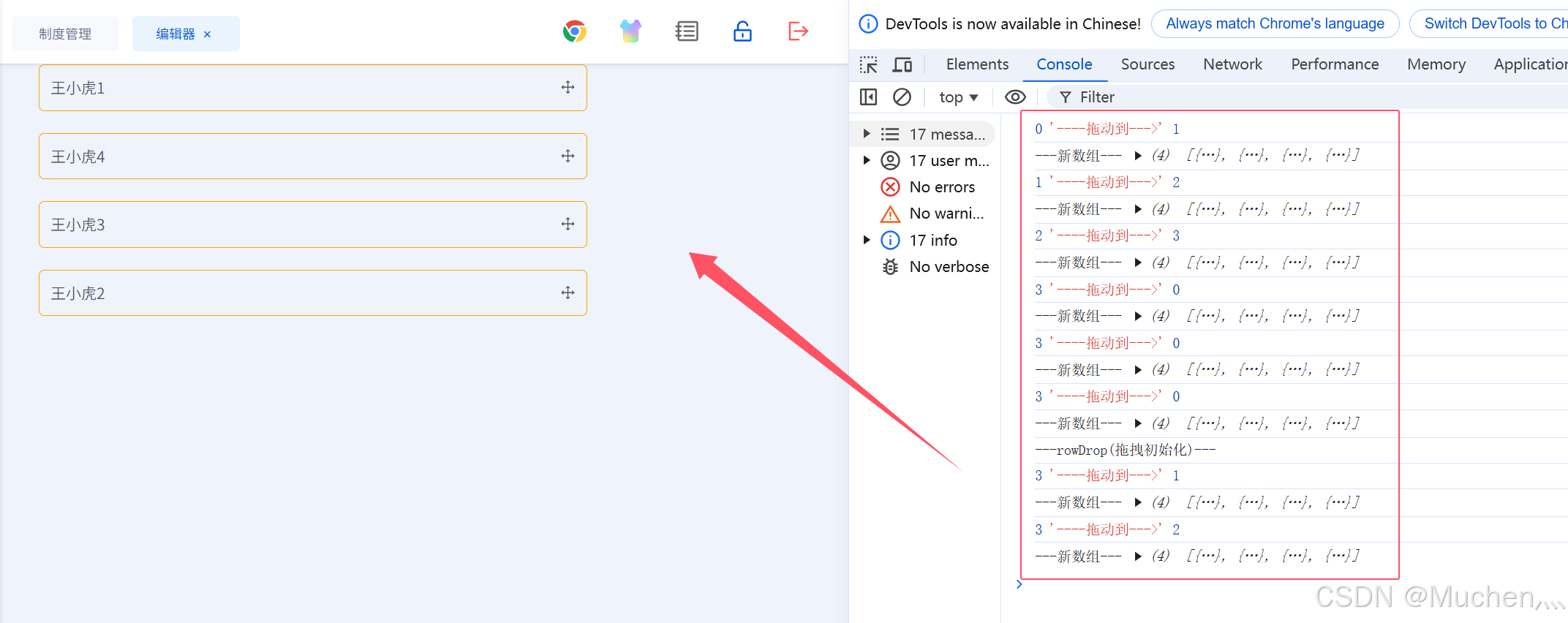
<template><div class="content"><ul id="table_count2"><!-- 注意 key必须是唯一的id, 如果用index就可能导致渲染错误问题 --><li class="table_li" v-for="(item,index) in tableData" :key="'tli_'+item.id">         <span>{{ item.name  }}</span><i class="el-icon-rank handle_drop" style="font-size: 14px;"></i></li></ul></div>
</template><script>
import Sortable from 'sortablejs' //(1)引入拖拽函数
export default {name: "TableBase3",components: {},data() {return {tableData: [{id: 1,date: '2016-05-01',name: '王小虎1',address: '上海市普陀区金沙江路 1510 弄'}, {id: 2,date: '2016-05-02',name: '王小虎2',address: '上海市普陀区金沙江路 1511 弄'}, {id: 3,date: '2016-05-03',name: '王小虎3',address: '上海市普陀区金沙江路 1512 弄'}, {id: 4,date: '2016-05-04',name: '王小虎4',address: '上海市普陀区金沙江路 1513 弄'}]}},created() { },mounted() {this.rowDrop() //(2)组件创建时执行拖拽方法},methods: {// (3)拖拽方法rowDrop() {// 要侦听拖拽响应的DOM对象console.log('---rowDrop(拖拽初始化)---')const el = document.querySelector('#table_count2');const that = this;new Sortable(el, {animation: 150,handle: '.handle_drop', //class类名执行事件ghostClass: 'blue-background-class',// 结束拖拽后的回调函数onEnd({ newIndex, oldIndex }) {console.log(oldIndex, '----拖动到--->', newIndex)const tempList = [...that.tableData]/**splice 新增删除并以数组的形式返回删除内容;(此处表示获取删除项对象) */const currentRow = tempList.splice(oldIndex, 1)[0];tempList.splice(newIndex, 0, currentRow);/** 在新下标前添加一个数据, 第二个参数 0 表示不删除,即为新增 */console.log('---新数组---', tempList)that.tableData = [...tempList]}// onEnd: (evt) => {//     console.log('----onEnd(拖拽结束)---', evt)// },});},},
};
</script><style  lang="scss" scoped>.table_li{width: 500px;padding: 10px;border: 1px solid orange;border-radius: 5px;margin-bottom: 20px;display: flex;align-items: center;justify-content: space-between;
}
</style>
- 相关文档:Element UI table表格行拖动排序_element表格拖拽改变顺序-CSDN博客
