网站开发的总结seo优化评论
需求
在服务器搭建点播/视频平台的话需要在服务器搭建nginx和rtmp模块
rtmp模块
rtmp 模块有 nginx-rtmp-module ,但是我们这里使用 nginx-http-flv-module 来替代。因为后者是基于前者开发的,前者拥有的功能后者都有,后者是国内的开发开发,有中文文档
下载nginx-http-flv-module 源码
#下载nginx-http-flv-module
wget https://github.com/winshining/nginx-http-flv-module/archive/master.zip
#解压 nginx-http-flv-module
unzip master.zip#一般将这个放在usr/local,目录下
接着下载 nginx.本身的源码
#我这边选择1.24.0版本
wget http://nginx.org/download/nginx-1.24.0.tar.gz
#然后解压
tar -zxvf nginx-1.24.0.tar.gz#进入nginx安装目录
cd /usr/local/nginx-1.24.0#执行 ../相对路径
./configure --add-module=../nginx-http-flv-module-mastermake
make install#安装好之后,nginx会默认出现在/usr/local/nginx
先将nginx配置到全局命令中 /etc/profile
vim /etc/profile
#将这行命令添加到最后一行
export PATH=/usr/local/nginx/sbin/:$PATH#保存退出并重载资源
source /etc/profile#查看是否已经添加了rtmp模块
nginx -V#出现configure arguments: --add-module=../nginx-http-flv-module-master
#说明已经添加了rtmp模块
开始进入rtmp配置
rtmp{server{listen 1935;chunk_size 4096;application hls{live on;allow publish all;allow play all;  # 允许所有用户播放流record off;hls on;hls_path /usr/local/video/hls;hls_fragment 10s;  #切片时长hls_playlist_length 60m; #播放列表hls_continuous on;  hls_cleanup off;  # 防止自动清除切片}application vod{# 播放地址为 rtmp://ip:1935/vod/1.mp4 play /usr/local/video/vod;}}
}
如果希望播放m3u8格式的视频,即实时视频,可以在server中配置
location /hls/ {types {application/vnd.apple.mpegurl m3u8;video/mp2t ts;}root /usr/local/video/; # 设置HLS文件所在的根目录add_header Cache-Control no-cache; # 禁止缓存add_header Access-Control-Allow-Origin *; #允许跨域请求。}
保存并退出之后使用nginx -t 查看是否配置有报错
切记:配置的播放/存储地址信息要先配好,不然执行的时候会报错!
点播测试(记得开发1935端口和nginx中server配置的端口80)
测试vod点播模块,现在vod目录下放入一个mp4文件

使用测试工具vlc
依次选择 媒体->打开网络串流
输入rtmp://ip:1935/vod/2.mp4
如果有报错的话可以先打开工具->消息,然后再次执行
注意:记得先启动nginx ,进入nginx目录输入nginx
查看nginx是否启动 ps -ef|grep nginx
使用ffmpeg推送视频到服务器并进行测试
在本地电脑下载ffmpeg,然后进入ffmpeg目录
ffmpeg -i D:\picture\video\4.mp4 -c:v libx264 -c:a aac -f flv rtmp://ip:1935/hls/test

这样即上传视频成功
在vlc中再次测试http://ip:80/hls/test.m3u8
不过在vlc上测试可能会有问题,比如它会只从中间播放,或者不能左移右移,又或者最后一段不能播放的问题

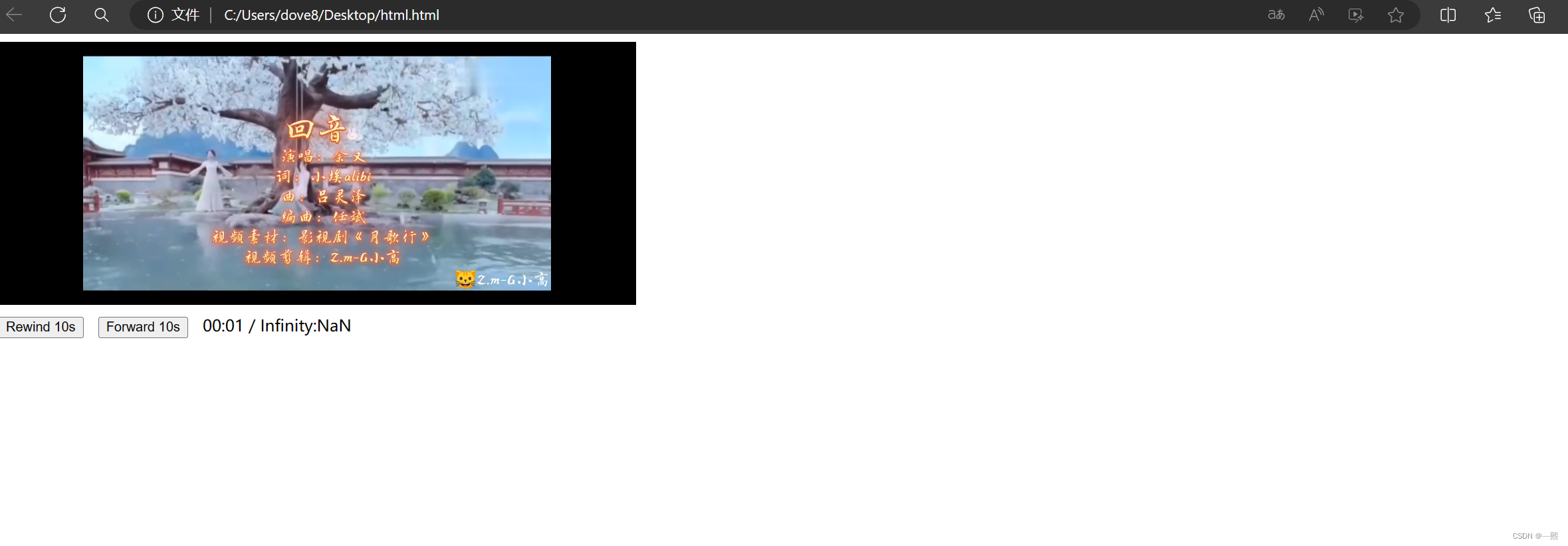
可以用以下方式实战测试。
在桌面新建一个文本文档,然后把下面代码输进去,并且将后缀.txt 修改为.html。
注意:在<source src > 这里将地址信息修改为你自己的地址
<!DOCTYPE html>
<html lang="en">
<head><meta charset="UTF-8"><title>HLS Video</title><link href="https://vjs.zencdn.net/7.11.4/video-js.css" rel="stylesheet" /><style>#controls {margin-top: 10px;}#controls button {margin-right: 10px;}</style>
</head>
<body><video id="my-video" class="video-js" controls preload="auto" width="640" height="264" data-setup="{}"><source src="http://ip:80/hls/test.m3u8" type="application/x-mpegURL"></video><div id="controls"><button id="rewind">Rewind 10s</button><button id="forward">Forward 10s</button><span id="current-time">00:00</span> / <span id="duration">00:00</span></div><script src="https://vjs.zencdn.net/7.11.4/video.js"></script><script>var player = videojs('my-video');// Update current time and durationplayer.on('timeupdate', function() {document.getElementById('current-time').innerText = formatTime(player.currentTime());document.getElementById('duration').innerText = formatTime(player.duration());});// Rewind buttondocument.getElementById('rewind').addEventListener('click', function() {player.currentTime(player.currentTime() - 10);});// Forward buttondocument.getElementById('forward').addEventListener('click', function() {player.currentTime(player.currentTime() + 10);});// Format time functionfunction formatTime(seconds) {var minutes = Math.floor(seconds / 60);var seconds = Math.floor(seconds % 60);return (minutes < 10 ? '0' : '') + minutes + ':' + (seconds < 10 ? '0' : '') + seconds;}// Ensure video starts from the beginningplayer.ready(function() {player.currentTime(0);});</script>
</body>
</html>
双击测试