SpringBoot 项目 基于aspose相关jar包 将excel 转换成pdf 导出
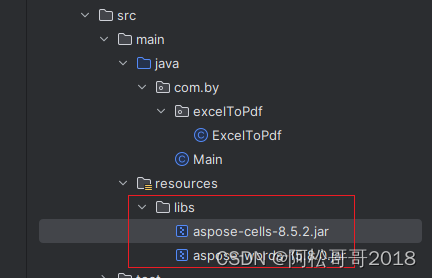
2、pom.xml中加入maven引入
<dependency><groupId>com.aspose.cells</groupId><artifactId>cells-8.5.2 </artifactId><scope>system</scope><systemPath>${project.basedir}/src/main/resources/libs/aspose-cells-8.5.2.jar</systemPath><version>8.5.2</version></dependency><dependency><groupId>com.aspose.words</groupId><artifactId>words-15.8.0 </artifactId><scope>system</scope><systemPath>${project.basedir}/src/main/resources/libs/aspose-words-15.8.0.jar</systemPath><version>15.8.0</version></dependency>
2.1 使用SpringBoot打包插件生成jar包的时候,你会发现这个jar包不会被打进去,进而出现错误。解决这个问题就需要在maven打包插件中配置一个includeSystemScope属性
<build><finalName>${project.artifactId}</finalName><plugins><plugin><groupId>org.springframework.boot</groupId><artifactId>spring-boot-maven-plugin</artifactId><configuration><includeSystemScope>true</includeSystemScope></configuration></plugin></plugins></build>
3、编写转换工具类 如下
package com.by.excelToPdf;import com.aspose.cells.License;
import com.aspose.cells.PdfSaveOptions;
import com.aspose.cells.Workbook;import java.io.ByteArrayInputStream;
import java.io.ByteArrayOutputStream;
import java.io.FileOutputStream;
import java.io.InputStream;public class PdfUtil {public static ByteArrayOutputStream excel2pdf(ByteArrayInputStream is) {ByteArrayOutputStream bos = null;try {bos = new ByteArrayOutputStream();getLicense();Workbook wb = new Workbook(is);PdfSaveOptions pdfSaveOptions = new PdfSaveOptions();pdfSaveOptions.setOnePagePerSheet(true);wb.save(bos, pdfSaveOptions);bos.flush();bos.close();} catch (Exception e) {System.out.println("convert failed");e.printStackTrace();}return bos;}public static void excel2pdf(String excelFilePath) {excel2pdf(excelFilePath, null, null);}public static void excel2pdf(String excelFilePath, int[] convertSheets) {excel2pdf(excelFilePath, null, convertSheets);}public static void excel2pdf(String excelFilePath, String pdfFilePath) {excel2pdf(excelFilePath, pdfFilePath, null);}public static void excel2pdf(String excelFilePath, String pdfFilePath, int[] convertSheets) {try {pdfFilePath = pdfFilePath == null ? getPdfFilePath(excelFilePath) : pdfFilePath;getLicense();Workbook wb = new Workbook(excelFilePath);FileOutputStream fileOS = new FileOutputStream(pdfFilePath);PdfSaveOptions pdfSaveOptions = new PdfSaveOptions();pdfSaveOptions.setOnePagePerSheet(true);if (null != convertSheets) {printSheetPage(wb, convertSheets);}wb.save(fileOS, pdfSaveOptions);fileOS.flush();fileOS.close();System.out.println("convert success");} catch (Exception e) {System.out.println("convert failed");e.printStackTrace();}}private static String getPdfFilePath(String excelFilePath) {return excelFilePath.split("\\.")[0] + ".pdf";}private static void getLicense() {String licenseFilePath = "excel-license.xml";try {InputStream is = PdfUtil.class.getClassLoader().getResourceAsStream(licenseFilePath);License license = new License();license.setLicense(is);} catch (Exception e) {System.out.println("license verify failed");e.printStackTrace();}}private static void printSheetPage(Workbook wb, int[] sheets) {for (int i = 1; i < wb.getWorksheets().getCount(); i++) {wb.getWorksheets().get(i).setVisible(false);}if (null == sheets || sheets.length == 0) {wb.getWorksheets().get(0).setVisible(true);} else {for (int i = 0; i < sheets.length; i++) {wb.getWorksheets().get(i).setVisible(true);}}}
}
4、调用 工具类中有基于流的方式入参、文件地址方式入参等,大家可根据自行需要选择合适的转换方法
public static void main(String[] args) {String inputFile = "D:/testPdf/222.xlsx";String outputFile = "D:/testPdf/222.pdf";PdfUtil.excel2pdf(inputFile, outputFile);}
5、注意问题,以上转换在windows环境运行一切正常,可能部署到linux环境会存在中文乱码,引起乱码的原因可能是因为linux环境无中文相关字体
- linux环境查看字段方法 字体路径/usr/share/fonts
fc-cache
fc-list
fc-list :lang=zh
- 如果无中文字体 我们可能把windows环境中的字段上传至linux字段目录下,windows环境字段路径C:\Windows\Fonts,上传后安装字段
yum -y install mkfontscale mkfontdir fontconfig
mkfontscale && mkfontdir && fc-cache
- 如果使用docker 容器启动的应用服务,则还需要使用挂载卷的方式,将宿主体的字体和容器共享,具体方式即启动容器时 加上 “-v /usr/share/fonts/:/usr/share/fonts”
