
做网站是比特币的免费百度下载
Python TensorFlow 2.6 获取 MNIST 数据
- 2 Python TensorFlow 2.6 获取 MNIST 数据
- 1.1 获取 MNIST 数据
- 1.2 检查 MNIST 数据
- 2 Python 将npz数据保存为txt
- 3 Java 获取数据并使用SVM训练
- 4 Python 测试SVM准确度
2 Python TensorFlow 2.6 获取 MNIST 数据
1.1 获取 MNIST 数据
获取 MNIST 数据
import numpy as np
import tensorflow as tffrom tensorflow.keras import datasetsprint(tf.__version__)(train_data, train_label), (test_data, test_label) = datasets.mnist.load_data()
np.savez('D:\\OneDrive\\桌面\\mnist.npz', train_data = train_data, train_label = train_label, test_data = test_data,test_label = test_label)
C:\ProgramData\Anaconda3\envs\tensorflow\python.exe E:/SourceCode/PyCharm/Test/study/exam.py
2.6.0Process finished with exit code 0
1.2 检查 MNIST 数据
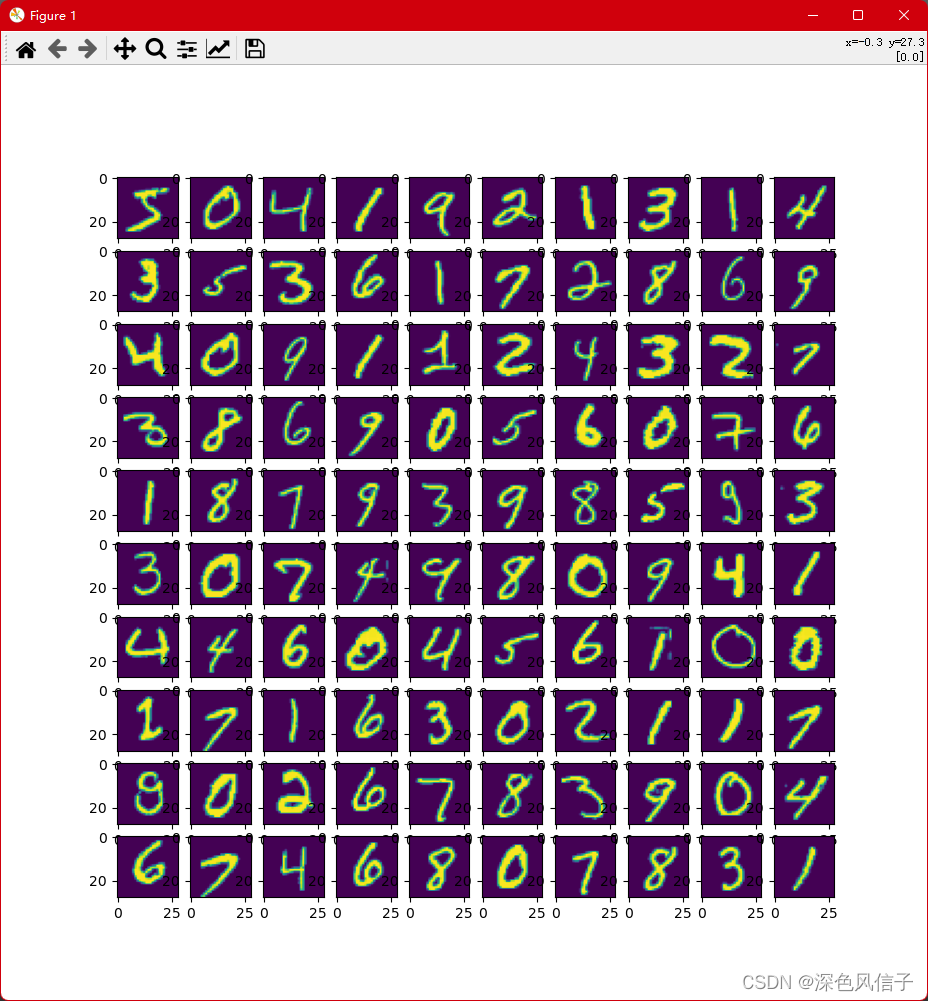
import matplotlib.pyplot as plt
import numpy as npdata = np.load('D:\\OneDrive\\桌面\\mnist.npz')
print(data.files)image = data['train_data'][0:100]
label = data['train_label'].reshape(-1, )
print(label)
plt.figure(figsize = (10, 10))
for i in range(100):print('%f, %f' % (i, label[i]))plt.subplot(10, 10, i + 1)plt.imshow(image[i])
plt.show()
2 Python 将npz数据保存为txt
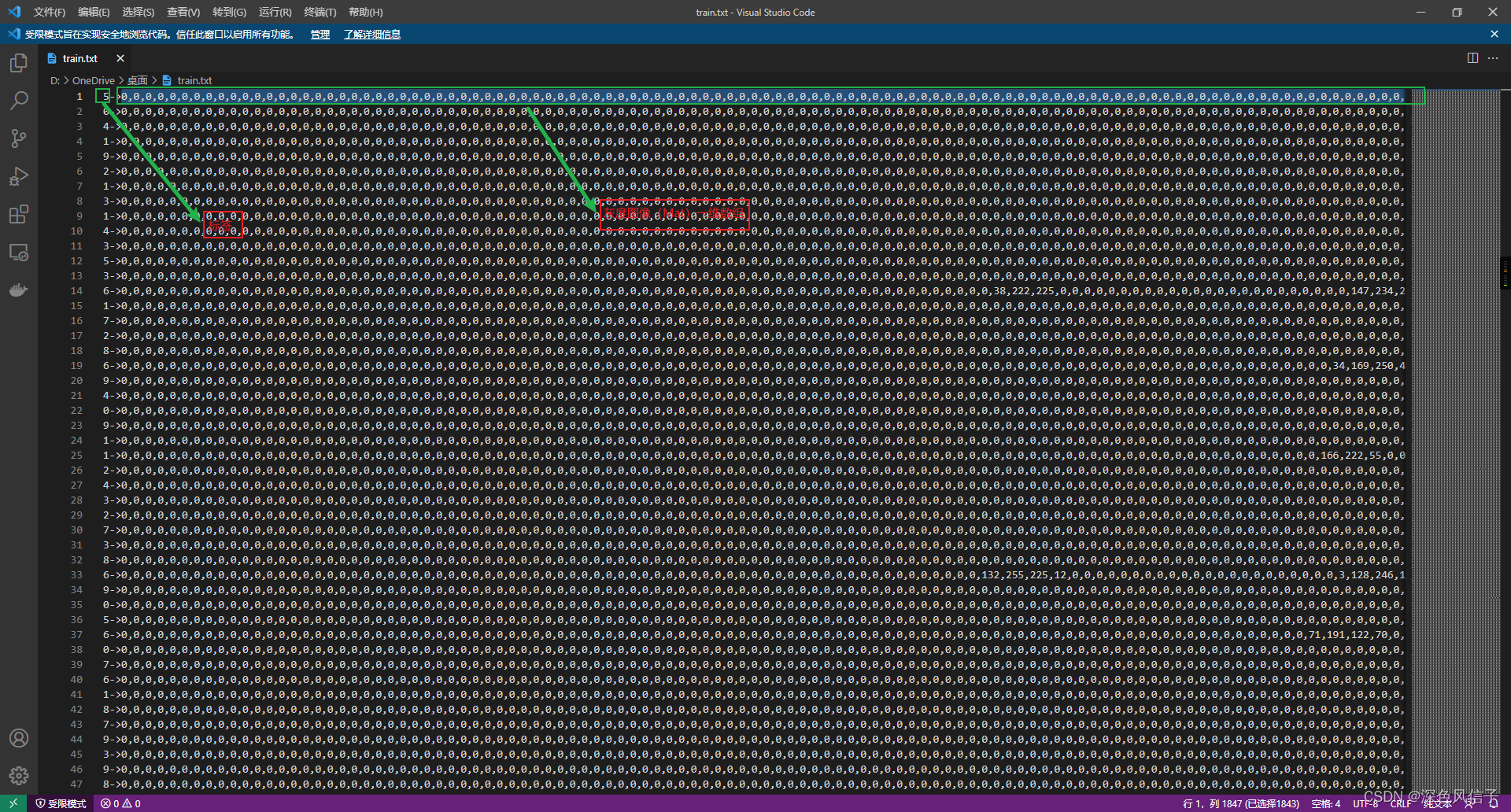
import numpy as np# 加载mnist数据
data = np.load('D:\\学习\\mnist.npz')
# 获取 训练数据
train_image = data['x_test']
train_label = data['y_test']
train_image = train_image.reshape(train_image.shape[0], -1)
train_image = train_image.astype(np.int32)
train_label = train_label.astype(np.int32)
train_label = train_label.reshape(-1, 1)
index = 0
file = open('D:\\OneDrive\\桌面\\predict.txt', 'w+')
for arr in train_image:file.write('{0}->{1}\n'.format(train_label[index][0], ','.join(str(i) for i in arr)))index = index + 1
file.close()
3 Java 获取数据并使用SVM训练
package com.xu.opencv;import java.io.BufferedReader;
import java.io.FileReader;
import java.util.Arrays;
import java.util.HashMap;
import java.util.Map;import org.opencv.core.Core;
import org.opencv.core.CvType;
import org.opencv.core.Mat;
import org.opencv.core.TermCriteria;
import org.opencv.ml.Ml;
import org.opencv.ml.SVM;/*** @author Administrator*/
public class Train {static {System.loadLibrary(Core.NATIVE_LIBRARY_NAME);}public static void main(String[] args) throws Exception {predict();}public static void predict() throws Exception {SVM svm = SVM.load("D:\\OneDrive\\桌面\\ai.xml");BufferedReader reader = new BufferedReader(new FileReader("D:\\OneDrive\\桌面\\predict.txt"));Mat train = new Mat(6, 28 * 28, CvType.CV_32FC1);Mat label = new Mat(1, 6, CvType.CV_32SC1);Map<String, Mat> map = new HashMap<>(2);int index = 0;String line = null;while ((line = reader.readLine()) != null) {int[] data = Arrays.asList(line.split("->")[1].split(",")).stream().mapToInt(Integer::parseInt).toArray();for (int i = 0; i < 28 * 28; i++) {train.put(index, i, data[i]);}label.put(index, 0, Integer.parseInt(line.split("->")[0]));index++;if (index >= 6) {break;}}Mat response = new Mat();svm.predict(train, response);for (int i = 0; i < response.height(); i++) {System.out.println(response.get(i, 0)[0]);}}public static void train() throws Exception {SVM svm = SVM.create();svm.setC(1);svm.setP(0);svm.setNu(0);svm.setCoef0(0);svm.setGamma(1);svm.setDegree(0);svm.setType(SVM.C_SVC);svm.setKernel(SVM.LINEAR);svm.setTermCriteria(new TermCriteria(TermCriteria.EPS + TermCriteria.MAX_ITER, 1000, 0));Map<String, Mat> map = read("D:\\OneDrive\\桌面\\data.txt");svm.train(map.get("train"), Ml.ROW_SAMPLE, map.get("label"));svm.save("D:\\OneDrive\\桌面\\ai.xml");}public static Map<String, Mat> read(String path) throws Exception {BufferedReader reader = new BufferedReader(new FileReader(path));String line = null;Mat train = new Mat(60000, 28 * 28, CvType.CV_32FC1);Mat label = new Mat(1, 60000, CvType.CV_32SC1);Map<String, Mat> map = new HashMap<>(2);int index = 0;while ((line = reader.readLine()) != null) {int[] data = Arrays.asList(line.split("->")[1].split(",")).stream().mapToInt(Integer::parseInt).toArray();for (int i = 0; i < 28 * 28; i++) {train.put(index, i, data[i]);}label.put(index, 0, Integer.parseInt(line.split("->")[0]));index++;}map.put("train", train);map.put("label", label);reader.close();return map;}}
4 Python 测试SVM准确度
9.8% 求帮助
import cv2 as cv
import numpy as np# 加载预测数据
data = np.load('D:\\学习\\mnist.npz')
print(data.files)# 预测数据 处理
test_image = data['x_test']
test_label = data['y_test']test_image = test_image.reshape(test_image.shape[0], -1)
test_image = test_image.astype(np.float32)
test_label = test_label.astype(np.float32)
test_label = test_label.reshape(-1, 1)svm = cv.ml.SVM_load('D:\\OneDrive\\桌面\\ai.xml')predict = svm.predict(test_image)
predict = predict[1].reshape(-1, 1).astype(np.int32)
result = (predict == test_label.astype(np.int32))
print('{0}%'.format(str(result.mean() * 100)))
C:\ProgramData\Anaconda3\envs\opencv\python.exe E:/SourceCode/PyCharm/OpenCV/svm/predict.py
['x_train', 'y_train', 'x_test', 'y_test']
9.8%Process finished with exit code 0