市场营销网站建设软文撰写
python自动化办公之—Word
python-docx库
1、安装python-docx库
pip install python-docx
2、基本语法
1、打开文档
document = Document()
2、加入标题
document.add_heading('总标题',0)
document.add_heading('⼀级标题',1)
document.add_heading('⼆级标题',2)
3、添加文本
paragraph = document.add_paragraph('⽂本内容')
4、设置字号
run = paragraph.add_run('设置字号、')
run.font.size = Pt(34)
5、设置字体
run = paragraph.add_run('设置中⽂字体、')
run.font.name = '宋体'
r = run._element
r.rPr.rFonts.set(qn('w:eastAsia'), '宋体')
6、首行缩进
left_indent :左边缩进
right_indent :右边缩进
first_line_indent :⾸⾏缩进
3、样例1
from docx import Document
from docx.shared import Inches
doc = Document()
article = doc.add_paragraph ()
a2 = article.add_run("因______,特向您请事假____天。请假时间⾃_____年\
___⽉___⽇⾄_____年___⽉___⽇。这段时间内原计划安\
排的课程已做好处理,希望领导批准。")
# ⾸⾏缩进2个字符
article2_format = article.paragraph_format
article2_format.first_line_indent =Inches(0.3)
doc.save('test.docx')
4、增加列表
from docx import Document
from docx.shared import Inches
doc = Document()
doc.add_paragraph('⽆序列表1', style='List Bullet')
doc.add_paragraph('⽆序列表2', style='List Bullet')
doc.save('test.docx')
# Style='List Bullet' # 为⽆序
# Style='List Number' # 为有序
5、添加图片
from docx import Document
from docx.shared import Inches
doc = Document()
doc.add_picture('图片.jpg',width=Inches(1.35),heigh=Inches(1.35))
#png为图⽚名称(必须与代码⽂件在同⼀个⽂件夹内)
doc.save('test.docx')
6、添加表格
table = document.add_table(rows=1, cols=3)
hdr_cells = table.rows[0].cells
hdr_cells[0].text = 'Name'
hdr_cells[1].text = 'Id'
hdr_cells[2].text = 'Desc'
#再添加三行表格
for i in range(3):row_cells = table.add_row().cellsrow_cells[0].text = 'test'+str(i)row_cells[1].text = str(i)row_cells[2].text = 'desc'+str(i)
doc.save('test.docx')
7、获取文档操作
from docx import Document
docu = Document(r'test.docx')
paragraphs = docu.paragraphs
for paragraph in paragraphs:print(paragraph.text)
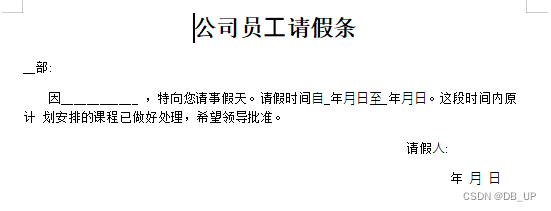
8、最终样例
from docx.enum.text import WD_PARAGRAPH_ALIGNMENT
from docx import Document
from docx.shared import Pt, Inches
from docx.oxml.ns import qn
doc = Document()
# 全局字体设置
doc.styles['Normal'].font.name = u'宋体'
doc.styles['Normal']._element.rPr.rFonts.set(qn('w:eastAsia'), u'宋体')
# 1、标题
title = doc.add_paragraph ()
title1 = title.add_run ('公司员⼯请假条') # 内容
title1.font.size = Pt(20) # 设置字体⼤⼩
title1.bold = True # 加粗
title.alignment =WD_PARAGRAPH_ALIGNMENT.CENTER
# 2、正⽂
article1 = doc.add_paragraph ()
a1 = article1.add_run('__部:')
article2 = doc.add_paragraph()
a2 = article2.add_run(
'因_______ ,特向您请事假天。请假时间⾃_年⽉⽇⾄_年⽉⽇。这段时间内原计 划安排的课程已做好处理,希望领导批准。')
# ⾸⾏缩进 负值表示悬挂缩进
article2_format = article2.paragraph_format
article2_format .first_line_indent =Inches(0.3)
article3 = doc.add_paragraph ()
a3 = article3.add_run('请假⼈:') # 内容
article3.alignment =WD_PARAGRAPH_ALIGNMENT.RIGHT
article3_format = article3.paragraph_format
article3_format.right_indent = Inches(0.9)
nowData = doc.add_paragraph ()
n3 = nowData.add_run('年 ⽉ ⽇') # 内容
nowData.alignment =WD_PARAGRAPH_ALIGNMENT.RIGHT
nowData_format = nowData.paragraph_format
nowData_format .right_indent = Inches(0.3)
# 这⼀步调整⽂件格式为居中
doc.save('test.docx' )