
媒体公司网站模板宁波品牌网站推广优化公司
flutter开发实战-video_player插件播放抖音直播实现(仅限Android端)
在之前的开发过程中,遇到video_player播放视频,通过查看video_player插件描述,可以看到video_player在Android端使用exoplayer,在iOS端使用的是AVPlayer。由于iOS的AVPlayer不支持flv、m3u8格式的直播,这里video_player播放抖音直播仅仅在Android有效,在iOS端,如果需要播放抖音直播,可以使用fijkplayer插件进行播放,由于fijkplayer使用的是ijkplayer,可以播放flv、m3u8格式的直播。
一、引入
在pubspec.yaml中引入video_player
# 播放器video_player: ^2.7.0# fijkplayer: ^0.11.0
二、实现VideoPlayer的Widget
2.1 在iOS中的设置
在iOS工程中info.plist添加一下设置,以便支持Https,HTTP的视频地址
<key>NSAppTransportSecurity</key>
<dict><key>NSAllowsArbitraryLoads</key><true/>
</dict>
2.2 在Android中的设置
需要在/android/app/src/main/AndroidManifest.xml文件中添加网络权限
<uses-permission android:name="android.permission.INTERNET"/>
2.3 播放的VideoPlayer
使用video_player插件,需要使用VideoPlayerController来控制播放、暂停、添加监听
初始化后添加监听,来获取VideoPlayerController中的Value值,可以看到一些状态。例如
VideoPlayerValue(duration: 0:00:00.001000, size: Size(1280.0, 720.0), position: 0:32:14.877000, caption: Caption(number: 0, start: 0:00:00.000000, end: 0:00:00.000000, text: ), captionOffset: 0:00:00.000000, buffered: [DurationRange(start: 0:00:00.000000, end: 0:32:17.868000)], isInitialized: true, isPlaying: true, isLooping: false, isBuffering: false, volume: 1.0, playbackSpeed: 1.0, errorDescription: null, isCompleted: false)
添加监听
// 添加监听void addListener() {if (_controller != null) {_controller!.addListener(videoListenerCallback);}}
移除监听
// 移除监听void removeListener() {if (_controller != null) {_controller!.removeListener(videoListenerCallback);}}
监听的callback回调
void videoListenerCallback() {// 监听结果if (_controller != null) {if (_controller!.value.hasError) {// 出现错误setState(() {});}if (_controller!.value.isCompleted) {// 直播完成setState(() {});}if (_controller!.value.isBuffering) {// 正在buffer}if (_controller!.value.hasError || _controller!.value.isCompleted) {// 是否处于错误状态 或者 播放完成if (widget.liveController.onOutLinkPlayerCompleted != null) {widget.liveController.onOutLinkPlayerCompleted!();}}if (_controller!.value.hasError == false) {// 可播放,隐藏封面if (widget.liveController.onOutLinkPlayerCanPlay != null) {widget.liveController.onOutLinkPlayerCanPlay!();}}}}
播放
Future<void> play() async {
if (_controller != null) {await _controller?.play();}
}
暂停
Future<void> play() async {
if (_controller != null) {await _controller?.pause();}
}
完整代码如下
// 视频播放测试
class VideoPlayerSkeleton extends StatefulWidget {const VideoPlayerSkeleton({Key? key,required this.videoUrl,required this.isLooping,this.autoPlay = true,required this.width,required this.height,}) : super(key: key);final String videoUrl;final bool isLooping;final bool autoPlay;final double width;final double height;State<VideoPlayerSkeleton> createState() => _VideoPlayerSkeletonState();
}class _VideoPlayerSkeletonState extends State<VideoPlayerSkeleton> {VideoPlayerController? _controller;void initState() {super.initState();videoPlay();print("_VideoPlayerSkeletonState videoUrl:${widget.videoUrl}");}// 添加监听void addListener() {if (_controller != null) {_controller!.addListener(videoListenerCallback);}}void videoListenerCallback() {// 监听结果if (_controller != null) {if (_controller!.value.hasError) {// 出现错误setState(() {});}if (_controller!.value.isCompleted) {// 直播完成setState(() {});}if (_controller!.value.isBuffering) {// 正在buffer}}}// 移除监听void removeListener() {if (_controller != null) {_controller!.removeListener(videoListenerCallback);}}// 播放视频Future<void> videoPlay() async {_controller?.dispose();_controller = VideoPlayerController.networkUrl(Uri.parse(widget.videoUrl),videoPlayerOptions: VideoPlayerOptions(mixWithOthers: true,allowBackgroundPlayback: false,),);addListener();await _controller?.initialize().then((_) {// Ensure the first frame is shown after the video is initialized, even before the play button has been pressed.setState(() {});}).catchError((error) {// 是否处于错误状态 或者 播放完成if (widget.liveController.onOutLinkPlayerCompleted != null) {widget.liveController.onOutLinkPlayerCompleted!();}}).whenComplete(() {// print('checkAnimationTimeout whenComplete');});await _controller!.setLooping(widget.isLooping);if (widget.autoPlay) {await _controller?.play();} else {await _controller?.pause();}}Widget build(BuildContext context) {return Container(width: widget.width,height: widget.height,color: Colors.black87,child: Stack(alignment: Alignment.center,children: [buildVideoPlayer(context),buildStateIntro(context),],),);}// 播放视频Widget buildVideoPlayer(BuildContext context) {if (_controller != null && _controller!.value.isInitialized) {return AspectRatio(aspectRatio: _controller!.value.aspectRatio,child: VideoPlayer(_controller!),);}return Container();}// 播放过程中出现errorWidget buildStateIntro(BuildContext context) {if (_controller != null) {String title = "";String message = "";bool showIntro = false;if (_controller!.value.hasError) {showIntro = true;title = "播放出现错误";message = _controller!.value.errorDescription ?? "";} else {if (_controller!.value.isCompleted) {showIntro = true;title = "播放结束";}}if (showIntro) {return Container(padding: EdgeInsets.symmetric(vertical: 50.r, horizontal: 50.r),color: Colors.transparent,child: Column(mainAxisAlignment: MainAxisAlignment.center,crossAxisAlignment: CrossAxisAlignment.center,children: [Expanded(child: Container()),Text(title,textAlign: TextAlign.center,softWrap: true,style: TextStyle(fontSize: 28.r,fontWeight: FontWeight.w500,fontStyle: FontStyle.normal,color: Colors.white,decoration: TextDecoration.none,),),SizedBox(height: 25.r,),Text(message,textAlign: TextAlign.center,softWrap: true,style: TextStyle(fontSize: 22.r,fontWeight: FontWeight.w500,fontStyle: FontStyle.normal,color: Colors.white,decoration: TextDecoration.none,),),Expanded(child: Container()),],),);}}return Container();}void dispose() {// TODO: implement disposeremoveListener();_controller?.dispose();super.dispose();}
}
三、从抖音网站上找到直播地址
由于使用抖音播放地址,这里简单描述一下从抖音网站上找到直播的flv地址。
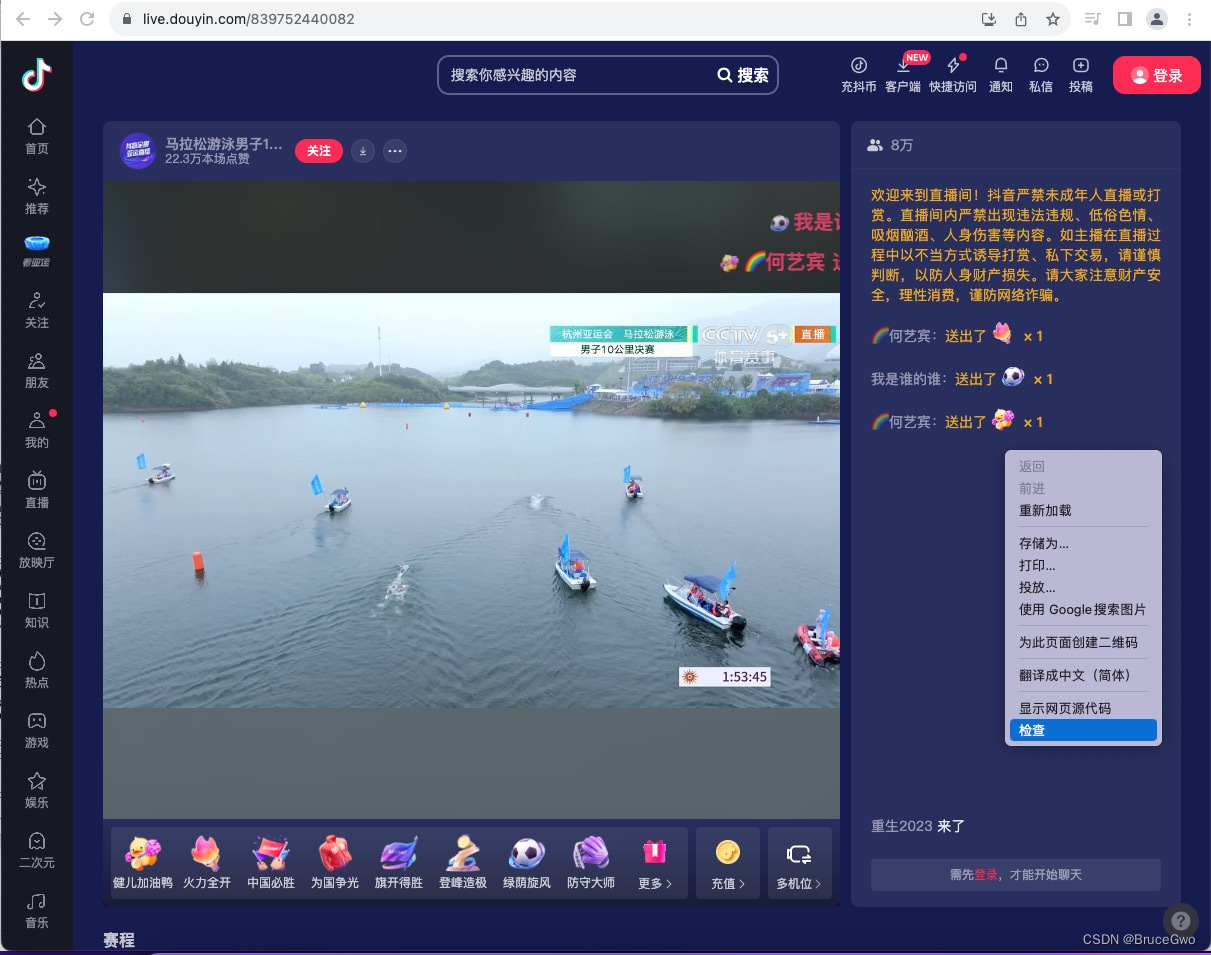
进入抖音直播间,在网页点击鼠标右键,看到检查。
https://live.douyin.com/567752440034
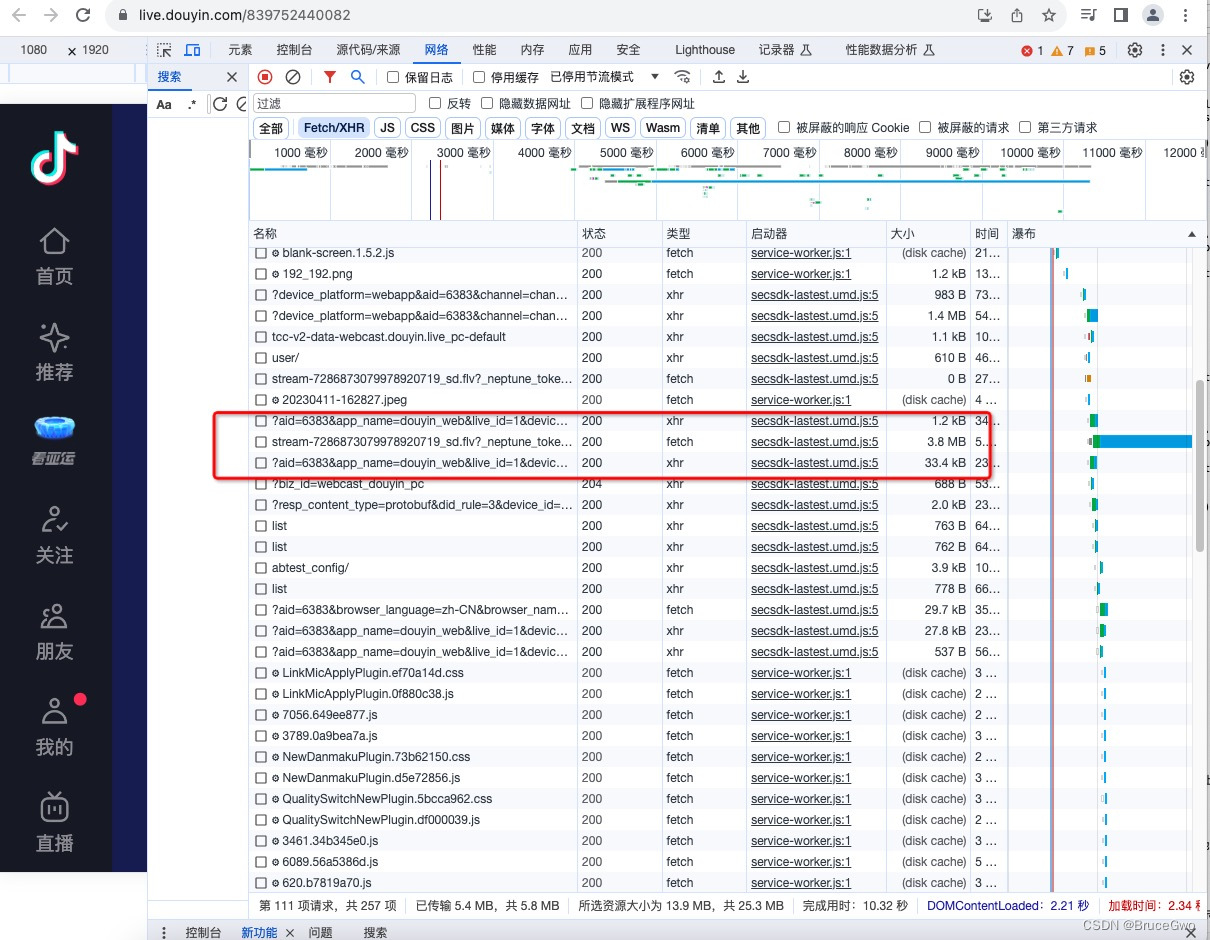
找到网络,刷新页面,可以看到stream的一条,
复制地址即可,使用该地址播放直播
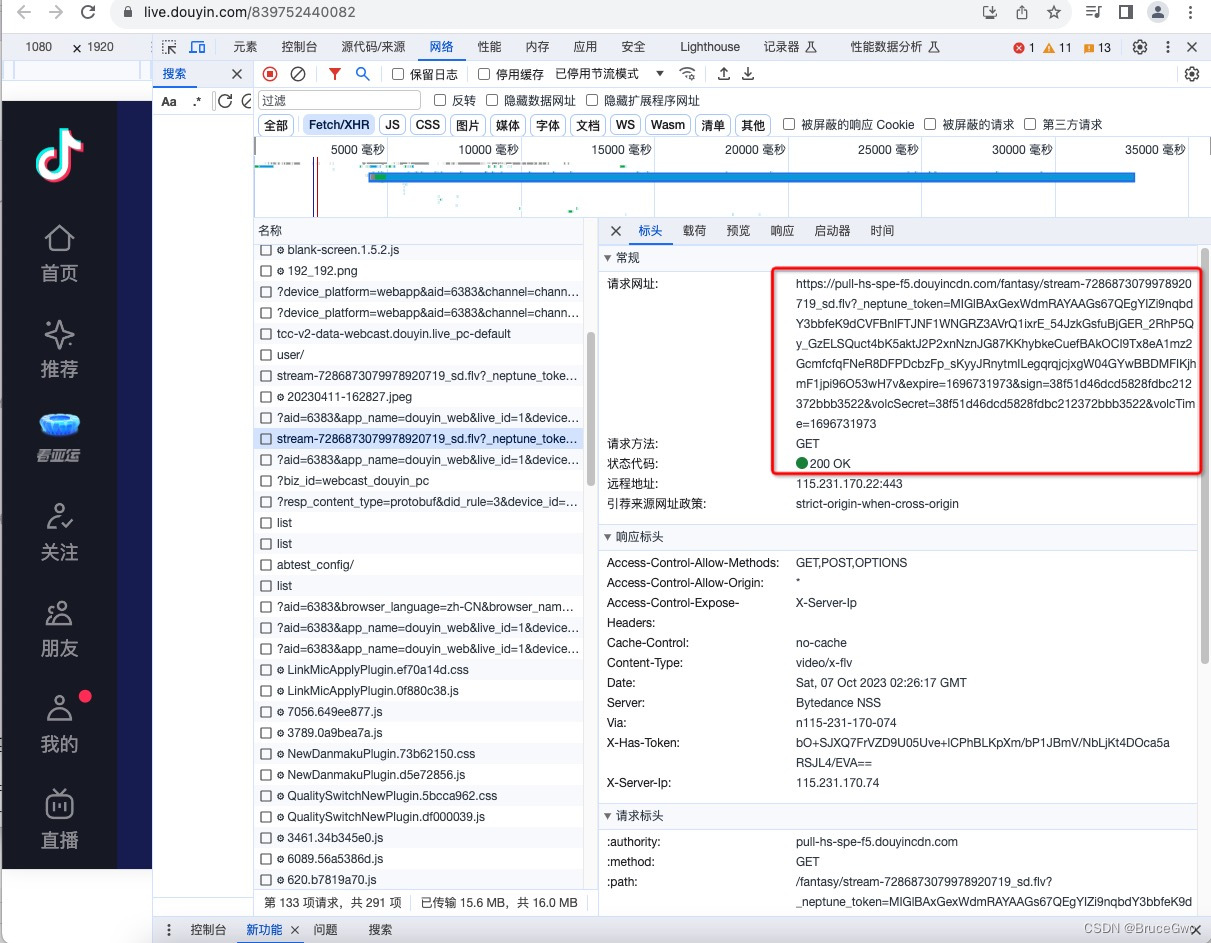
https://pull-hs-spe-f5.douyincdn.com/fantasy/stream-728687306789918920718_sd.flv?_neptune_token=MIGlBAxGexWdmRAYAAGs67QEgYIZi9nqbdY3bbfeK9dCVFBnlFTJNF1WNGRZ3AVrQ1ixrE_54JzkGsfuBjGER_2RhP5Qy_GzELSQuct4bK5aktJ2P2xnNznJG87KKhybkeCuefBAkOCI9Tx8eA1mz2GcmfcfqFNeR8DFPDcbzFp_sKyyJRnytmILegqrqjcjxgW04GYwBBDMFIKjhmF1jpi96O53wH7v&expire=1696731973&sign=38f51d46dcd5828fdbc212372bbb3522&volcSecret=38f51d46dcd5828fdbc212372bbb3522&volcTime=1696731973
四、查看直播结果
之后,我们将地址复制到VideoPlayerSkeleton中,运行后,可以看到播放的效果

注意:直接在Container上设置大小后,child是AspectRatio(
aspectRatio: _controller!.value.aspectRatio,
child: VideoPlayer(_controller!),
);
会出现画面变形,可以使用Stack嵌套一下。
五、小结
flutter开发实战-video_player插件播放抖音直播实现(仅限Android端)。描述可能不是特别准确,请见谅。
https://blog.csdn.net/gloryFlow/article/details/133634186
学习记录,每天不停进步。