
小程序 微网站seo技术网网
目前使用springboot开发是嵌入方式的tomcat,不需要单独使用tomcat,那么经常在服务器上运行jar包,这里记录一下在centos7系统里运行jar的方式。
在运行之前需要确定centos7系统是否安装了java环境以及配置环境变量,还有jar需要运行的 jdk版本,比如java jdk1.8
demo地址:Centos系统里运行java的jar启动脚本
在ssh窗口直接运行jar包
java -jar boot-example-hello-0.0.1-SNAPSHOT.jar这种直接运行的方式优点是快速运行,临时测试的时候可以用,但是在关闭ssh连接窗口或者ctrl+c后就会停掉或打断改方式,长时间运行是不行的。
2.在ssh窗口使用nohup方式运行jar包
nohup java -jar boot-example-hello-0.0.1-SNAPSHOT.jar &nohup 指的是不挂断运行命令,当ssh窗口退出后,程序是可以运行的,但是这样会产生nohup.out文件,这个文件会越来越大,当然也可以指定文件,或者不要nohup等日志文件,直接扔进垃圾箱里
有控制台日志的方式
nohup java -jar boot-example-hello-0.0.1-SNAPSHOT.jar > run.log &无日志的方式
nohup java -jar boot-example-hello-0.0.1-SNAPSHOT.jar > /dev/null 2>&1 &3.使用.sh脚本方式启动jar包
新建脚本文件boot-example-hello.sh(注意centos和windows的.sh文件末尾的换行符可能导致.sh文件启动失败)
#!/bin/sh
RESOURCE_NAME=boot-example-hello-0.0.1-SNAPSHOT.jar# 先kill -15 pid
tpid=`ps -ef|grep $RESOURCE_NAME|grep -v grep|grep -v kill|awk '{print $2}'`
if [ ${tpid} ]; then
echo 'Stop Process...'
kill -15 $tpid
fi
sleep 5
# 再kill -9 pid
tpid=`ps -ef|grep $RESOURCE_NAME|grep -v grep|grep -v kill|awk '{print $2}'`
if [ ${tpid} ]; then
echo 'Kill Process!'
kill -9 $tpid
else
echo 'Stop Success!'
fi
# 启动app
tpid=`ps -ef|grep $RESOURCE_NAME|grep -v grep|grep -v kill|awk '{print $2}'`
if [ ${tpid} ]; thenecho 'App is running.'
elseecho 'App is NOT running.'
firm -f tpid
nohup java -jar $RESOURCE_NAME > /dev/null 2>&1 &
# nohup java -jar $RESOURCE_NAME > boot-example-hello.log &
echo $! > tpid
echo Start Success!
将脚本文件和jar包放在同一个目录下面

关键点儿
RESOURCE_NAME=boot-example-hello-0.0.1-SNAPSHOT.jar脚本文件需要给执行权限
chmod u+x boot-example-hello.sh[root@myw ~]# cd /home/boot-java
[root@myw boot-java]# ls
boot-example-hello-0.0.1-SNAPSHOT.jar boot-example-hello.sh
[root@myw boot-java]# chmod u+x boot-example-hello.sh
[root@myw boot-java]# ./boot-example-hello.sh
Stop Success!
App is NOT running.
Start Success!
[root@myw boot-java]# netstat -lnp|grep java
tcp6 0 0 :::8116 :::* LISTEN 11503/java
[root@myw boot-java]# ./boot-example-hello.sh
Stop Process...
Stop Success!
App is NOT running.
Start Success!
[root@myw boot-java]# netstat -lnp|grep java
tcp6 0 0 :::8116 :::* LISTEN 11616/java
[root@myw boot-java]# kill -9 11616
[root@myw boot-java]# netstat -lnp|grep java
[root@myw boot-java]# 可以看到如此方便多了,不管jar包是否之前启动过,只要执行这个脚本都是可以启动的,如果之前启动过,那么会被杀掉重新启动,要把他杀掉的话,直接kill -9 pid方式(非常暴力,但也非常使用,很重要的项目不能这么玩,万一程序有未完成的任务就麻烦了)
可是这么玩,万一云服务器掉电或者其他原因重启,那么也需要重新运行脚本
4.在.sh脚本里增加输入参数,使之能够start stop restart和建立服务启动方式,支持开机启动
新建脚本文件boot-example-hello-service.sh
我部署的java jdk路径在/usr/local/jdk18/bin下面
jar包路径在/home/boot-java
具体jar包boot-example-hello-0.0.1-SNAPSHOT.jar
因为开机启动需要,所以java的启动路径写全了的
#!/bin/bash
# java sdk 环境路径
JAVA_HOME_BIN="/usr/local/jdk18/bin"
# jar包路径
RESOURCE_PATH="/home/boot-java"
# jar包名字
RESOURCE_NAME="boot-example-hello-0.0.1-SNAPSHOT.jar"
# param start stop restart
param=$1
pid=`ps -ef|grep java|grep $RESOURCE_NAME|awk '{print $2}'`startup(){nohup $JAVA_HOME_BIN/java $RESOURCE_PARAM -jar $RESOURCE_PATH/$RESOURCE_NAME > /dev/null 2>&1 &#nohup $JAVA_HOME_BIN/java -jar $RESOURCE_PATH/$RESOURCE_NAME > $RESOURCE_PATH/run.log &sleep 3echo "$RESOURCE_NAME to running pid="`ps -ef|grep java|grep $RESOURCE_NAME|awk '{print $2}'`
}if [ ! $param ]; thenecho "specify param 'start|restart|stop'"exit
fiif [ $param == 'start' ]; thenif [ ! $pid ]; thenstartupelseecho "$RESOURCE_NAME is running pid=$pid"fi
fiif [ $param == 'restart' ]; thenif [ $pid ]; thenkill -9 $pidsleep 1echo "$pid is killed"fisleep 3startup
fiif [ $param == 'stop' ]; thenif [ $pid ]; thenkill -9 $pidsleep 3fiecho "$RESOURCE_NAME is stopped"
fi
运行指令
启动:./boot-example-hello-service.sh start
停止:./boot-example-hello-service.sh stop
重启:./boot-example-hello-service.sh restart
也是放在jar包的相同目录
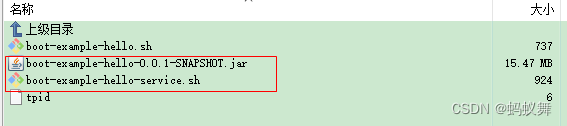
先给脚本权限
chmod u+x boot-example-hello-service.sh[root@myw boot-java]# chmod u+x boot-example-hello-service.sh
[root@myw boot-java]# ./boot-example-hello-service.sh start
boot-example-hello-0.0.1-SNAPSHOT.jar to running pid=11850
[root@myw boot-java]# ./boot-example-hello-service.sh start
boot-example-hello-0.0.1-SNAPSHOT.jar is running pid=11850
[root@myw boot-java]# netstat -lnp|grep java
tcp6 0 0 :::8116 :::* LISTEN 11850/java
[root@myw boot-java]# ./boot-example-hello-service.sh restart
11850 is killed
boot-example-hello-0.0.1-SNAPSHOT.jar to running pid=11921
[root@myw boot-java]# netstat -lnp|grep java
tcp6 0 0 :::8116 :::* LISTEN 11921/java
[root@myw boot-java]# ./boot-example-hello-service.sh stop
boot-example-hello-0.0.1-SNAPSHOT.jar is stopped
[root@myw boot-java]# netstat -lnp|grep java
[root@myw boot-java]# 新建一个服务boot-hello.service
[Unit]
Description=java boot
After=network.target
After=network-online.target[Service]
Type=forking
ExecStart=/home/boot-java/boot-example-hello-service.sh start
ExecReload=/home/boot-java/boot-example-hello-service.sh restart
ExecStop=/home/boot-java/boot-example-hello-service.sh stop[Install]
WantedBy=multi-user.target
放入/etc/systemd/system/里面后刷新加载
/usr/lib/systemd/system/[root@myw boot-java]# systemctl daemon-reload
[root@myw boot-java]# systemctl start boot-hello.service
[root@myw boot-java]# netstat -lnp|grep java
tcp6 0 0 :::8116 :::* LISTEN 12216/java
[root@myw boot-java]# systemctl restart boot-hello.service
[root@myw boot-java]# netstat -lnp|grep java
tcp6 0 0 :::8116 :::* LISTEN 12284/java
[root@myw boot-java]# systemctl stop boot-hello.service
[root@myw boot-java]# netstat -lnp|grep java
[root@myw boot-java]# systemctl enable boot-hello.service
Created symlink from /etc/systemd/system/multi-user.target.wants/boot-hello.service to /usr/lib/systemd/system/boot-hello.service.
[root@myw boot-java]# 开机启动配置后使用reboot重启就可以测试
记录一下相关指令
// 重新加载
systemctl daemon-reload// 启动
systemctl start boot-hello.service// 重启
systemctl restart boot-hello.service// 停止
systemctl stop boot-hello.service// 加入开机启动
systemctl enable boot-hello.service// 取消开机启动
systemctl disable boot-hello.service// 查看所有的开机启动项
systemctl list-unit-files|grep enabled
有的时候我们要调优,就是设置jar包启动的堆栈参数
-Xms 是jvm启动时分配的内存,比如-Xms256m,表示分配256M
-Xmx 是jvm运行过程中分配的最大内存,比如-Xms512m,表示jvm进程最多只能够占用512M内存
-Xss 是jvm启动的每个线程分配的内存大小,比如-Xss=10m 表示分配了10M
那么启动jar包的运行指令
nohup java -Xms256m -Xmx512m -Xss10m -jar boot-example-hello-0.0.1-SNAPSHOT.jar > /dev/null 2>&1 &一般使用默认参数,有必要优化的可以在在启动脚本里设置
#!/bin/bash
# java sdk 环境路径
JAVA_HOME_BIN="/usr/local/jdk18/bin"# jar调优参数 这里开头和结尾没有空格 运行指令里有空格的
RESOURCE_PARAM="-Xms256m -Xmx512m -Xss10m"
# jar包路径
RESOURCE_PATH="/home/boot-java"
# jar包名字
RESOURCE_NAME="boot-example-hello-0.0.1-SNAPSHOT.jar"
# param start stop restart
param=$1
pid=`ps -ef|grep java|grep $RESOURCE_NAME|awk '{print $2}'`startup(){nohup $JAVA_HOME_BIN/java $RESOURCE_PARAM -jar $RESOURCE_PATH/$RESOURCE_NAME > /dev/null 2>&1 &sleep 3echo "$RESOURCE_NAME to running pid="`ps -ef|grep java|grep $RESOURCE_NAME|awk '{print $2}'`
}if [ ! $param ]; thenecho "specify param 'start|restart|stop'"exit
fiif [ $param == 'start' ]; thenif [ ! $pid ]; thenstartupelseecho "$RESOURCE_NAME is running pid=$pid"fi
fiif [ $param == 'restart' ]; thenif [ $pid ]; thenkill -9 $pidsleep 1echo "$pid is killed"fisleep 3startup
fiif [ $param == 'stop' ]; thenif [ $pid ]; thenkill -9 $pidsleep 3fiecho "$RESOURCE_NAME is stopped"
fi