
响应式做的好的网站百度用户服务中心人工电话
Filebeat基本概念
简介
Filebeat是一种轻量级日志采集器,内置有多种模块(auditd、Apache、Nginx、System、MySQL等),针对常见格式的日志大大简化收集、解析和可视化过程,只需一条命令即可。之所以能实现这一点,是因为它将自动默认路径(因操作系统而异)与Elasticsearch采集节点管道的定义和Kibana仪表板组合在一起。不仅如此,数个Filebeat模块还包括预配置的 Machine Learning 任务。另一点需要声明的是:根据采集的数据形式不同,形成了由多个模块组成的Beats。Beats是开源数据传输程序集,可以将其作为代理安装在服务器上,将操作数据发送给Elasticsearch,或者通过Logstash,在Kibana中可视化数据之前,在Logstash中进一步处理和增强数据。
Beats组成模块如下:
| 日志格式 | 采集所需组件框架 | 备注 |
|---|---|---|
| Audit data | Auditbeat | 轻量型审计日志采集器 |
| Log files | Filebeat | 轻量型日志采集器 |
| Availability | Heartbeat | 轻量型运行时间监控采集器 |
| Metrics | Metribeat | 轻量型指标采集器 |
| Network traffic | Packetbeat | 轻量型网络数据采集器 |
| Windows event logs | Winlogbeat | 轻量型Windows事件日志采集器 |
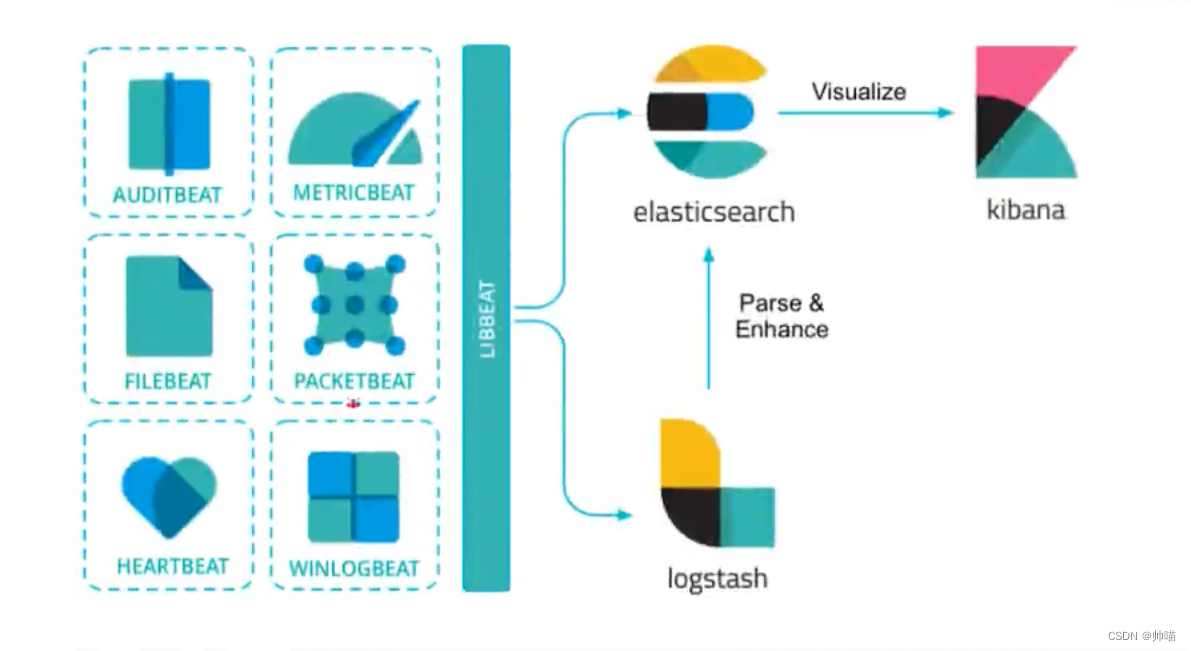
Filebeat特点
- 轻量型日志采集器,占用资源更少,对机器配置要求极低。
- 操作简便,可将采集到的日志信息直接发送到ES集群、Logstash、Kafka集群等消息队列中。
- 异常中断重启后会继续上次停止的位置。(通过${filebeat_home}\data\registry文件来记录日志的偏移量)。
- 使用压力敏感协议(backpressure-sensitive)来传输数据,在logstash忙的时候,Filebeat会减慢读取-传输速度,一旦logstash恢复,则Filebeat恢复原来的速度。
- Filebeat带有内部模块(auditd,Apache,Nginx,System和MySQL),可通过一个指定命令来简化通用日志格式的收集、解析和可视化。
bin/logstash -e 'input { stdin{} } output { stdout{} }'
Filebeat与Logstash对比
- Filebeat是轻量级数据托运者,您可以在服务器上将其作为代理安装,以将特定类型的操作数据发送到Elasticsearch。与Logstash相比,其占用空间小,使用的系统资源更少。
- Logstash具有更大的占用空间,但提供了大量的输入,过滤和输出插件,用于收集,丰富和转换来自各种来源的数据。
- Logstash是使用Java编写,插件是使用jruby编写,对机器的资源要求会比较高。在采集日志方面,对CPU、内存上都要比Filebeat高很多。
Filebeat安装
Filebeat本身对机器性能要求不高,采集数据后采用http请求发送数据。
下载链接:https://www.elastic.co/cn/downloads/beats/filebeat
注意下载版本对应一致,避免出现兼容性问题。
将下载的filebeat-8.9.0-linux-x86_64.tar.gz文件上传到/usr/local/software/路径上。
cd /usr/local/software/
tar -xzvf filebeat-8.9.0-linux-x86_64.tar.gz
mv filebeat-8.9.0-linux-x86_64 filebeat-8.9.0
cd filebeat-8.9.0
官方文档:https://www.elastic.co/guide/en/beats/filebeat/current/index.html
通过修改filebeat.yml文件
###################### Filebeat Configuration Example ########################## This file is an example configuration file highlighting only the most common
# options. The filebeat.reference.yml file from the same directory contains all the
# supported options with more comments. You can use it as a reference.
#
# You can find the full configuration reference here:
# https://www.elastic.co/guide/en/beats/filebeat/index.html# For more available modules and options, please see the filebeat.reference.yml sample
# configuration file.# ============================== Filebeat inputs ===============================filebeat.inputs:# Each - is an input. Most options can be set at the input level, so
# you can use different inputs for various configurations.
# Below are the input specific configurations.# filestream is an input for collecting log messages from files.
- type: filestream# Unique ID among all inputs, an ID is required.id: my-filestream-id# Change to true to enable this input configuration.# 输入默认是关闭状态,需要改成true打开enabled: false# Paths that should be crawled and fetched. Glob based paths.# 改成我们需要监控的日志文件paths:- /var/log/*.log#- c:\programdata\elasticsearch\logs\*# Windows的案例# Exclude lines. A list of regular expressions to match. It drops the lines that are# matching any regular expression from the list.# Line filtering happens after the parsers pipeline. If you would like to filter lines# before parsers, use include_message parser.#exclude_lines: ['^DBG']# Include lines. A list of regular expressions to match. It exports the lines that are# matching any regular expression from the list.# Line filtering happens after the parsers pipeline. If you would like to filter lines# before parsers, use include_message parser.#include_lines: ['^ERR', '^WARN']# Exclude files. A list of regular expressions to match. Filebeat drops the files that# are matching any regular expression from the list. By default, no files are dropped.#prospector.scanner.exclude_files: ['.gz$']# Optional additional fields. These fields can be freely picked# to add additional information to the crawled log files for filtering#fields:#  level: debug#  review: 1# ============================== Filebeat modules ==============================filebeat.config.modules:# Glob pattern for configuration loadingpath: ${path.config}/modules.d/*.yml# Set to true to enable config reloadingreload.enabled: false# Period on which files under path should be checked for changes#reload.period: 10s# ======================= Elasticsearch template setting =======================setup.template.settings:index.number_of_shards: 1#index.codec: best_compression#_source.enabled: false# ================================== General ===================================# The name of the shipper that publishes the network data. It can be used to group
# all the transactions sent by a single shipper in the web interface.
#name:# The tags of the shipper are included in their own field with each
# transaction published.
#tags: ["service-X", "web-tier"]# Optional fields that you can specify to add additional information to the
# output.
#fields:
#  env: staging# ================================= Dashboards =================================
# These settings control loading the sample dashboards to the Kibana index. Loading
# the dashboards is disabled by default and can be enabled either by setting the
# options here or by using the `setup` command.
#setup.dashboards.enabled: false# The URL from where to download the dashboards archive. By default this URL
# has a value which is computed based on the Beat name and version. For released
# versions, this URL points to the dashboard archive on the artifacts.elastic.co
# website.
#setup.dashboards.url:# =================================== Kibana ===================================# Starting with Beats version 6.0.0, the dashboards are loaded via the Kibana API.
# This requires a Kibana endpoint configuration.
setup.kibana:# Kibana Host# Scheme and port can be left out and will be set to the default (http and 5601)# In case you specify and additional path, the scheme is required: http://localhost:5601/path# IPv6 addresses should always be defined as: https://[2001:db8::1]:5601#host: "localhost:5601"# Kibana Space ID# ID of the Kibana Space into which the dashboards should be loaded. By default,# the Default Space will be used.#space.id:# =============================== Elastic Cloud ================================# These settings simplify using Filebeat with the Elastic Cloud (https://cloud.elastic.co/).# The cloud.id setting overwrites the `output.elasticsearch.hosts` and
# `setup.kibana.host` options.
# You can find the `cloud.id` in the Elastic Cloud web UI.
#cloud.id:# The cloud.auth setting overwrites the `output.elasticsearch.username` and
# `output.elasticsearch.password` settings. The format is `<user>:<pass>`.
#cloud.auth:# ================================== Outputs ===================================# Configure what output to use when sending the data collected by the beat.# ---------------------------- Elasticsearch Output ----------------------------
output.elasticsearch:# Array of hosts to connect to.hosts: ["localhost:9200"]# Protocol - either `http` (default) or `https`.#protocol: "https"# Authentication credentials - either API key or username/password.#api_key: "id:api_key"#username: "elastic"#password: "changeme"# ------------------------------ Logstash Output -------------------------------
#output.logstash:# The Logstash hosts#hosts: ["localhost:5044"]# Optional SSL. By default is off.# List of root certificates for HTTPS server verifications#ssl.certificate_authorities: ["/etc/pki/root/ca.pem"]# Certificate for SSL client authentication#ssl.certificate: "/etc/pki/client/cert.pem"# Client Certificate Key#ssl.key: "/etc/pki/client/cert.key"# ================================= Processors =================================
processors:- add_host_metadata:when.not.contains.tags: forwarded- add_cloud_metadata: ~- add_docker_metadata: ~- add_kubernetes_metadata: ~# ================================== Logging ===================================# Sets log level. The default log level is info.
# Available log levels are: error, warning, info, debug
#logging.level: debug# At debug level, you can selectively enable logging only for some components.
# To enable all selectors use ["*"]. Examples of other selectors are "beat",
# "publisher", "service".
#logging.selectors: ["*"]# ============================= X-Pack Monitoring ==============================
# Filebeat can export internal metrics to a central Elasticsearch monitoring
# cluster.  This requires xpack monitoring to be enabled in Elasticsearch.  The
# reporting is disabled by default.# Set to true to enable the monitoring reporter.
#monitoring.enabled: false# Sets the UUID of the Elasticsearch cluster under which monitoring data for this
# Filebeat instance will appear in the Stack Monitoring UI. If output.elasticsearch
# is enabled, the UUID is derived from the Elasticsearch cluster referenced by output.elasticsearch.
#monitoring.cluster_uuid:# Uncomment to send the metrics to Elasticsearch. Most settings from the
# Elasticsearch output are accepted here as well.
# Note that the settings should point to your Elasticsearch *monitoring* cluster.
# Any setting that is not set is automatically inherited from the Elasticsearch
# output configuration, so if you have the Elasticsearch output configured such
# that it is pointing to your Elasticsearch monitoring cluster, you can simply
# uncomment the following line.
#monitoring.elasticsearch:# ============================== Instrumentation ===============================# Instrumentation support for the filebeat.
#instrumentation:# Set to true to enable instrumentation of filebeat.#enabled: false# Environment in which filebeat is running on (eg: staging, production, etc.)#environment: ""# APM Server hosts to report instrumentation results to.#hosts:#  - http://localhost:8200# API Key for the APM Server(s).# If api_key is set then secret_token will be ignored.#api_key:# Secret token for the APM Server(s).#secret_token:# ================================= Migration ==================================# This allows to enable 6.7 migration aliases
#migration.6_to_7.enabled: true